


ターミナルがダサいとモテない。WezTermの背景をUnsplashで変える編。


Photo by Billy Huynh on Unsplash
WezTermをUnsplashでおしゃれにする!
こんにちは、長谷川です。
WezTermの背景をコマンドで変えられるようにしよ〜🔊
.config/wezterm/wezterm.lua
以下を加えてください。
細かい色や数値はお好きにどうぞ🧛
config.background
-------------------------------------------------------------------------------
-- background
config.background = {
 {
  source = { File = wezterm.config_dir .. "/unsplash.jpg" },
  height = "Cover",
  --width = "Cover",
  hsb = {
   brightness = 0.2,
   hue = 1,
   saturation = 1,
  },
  opacity = 0.2,
 },
}
config.window_background_gradient
若干斜めにグラデーションします🤣
-- background_gradient
config.window_background_gradient = {
 -- Can be "Vertical" or "Horizontal".  Specifies the direction
 -- in which the color gradient varies.  The default is "Horizontal",
 -- with the gradient going from left-to-right.
 -- Linear and Radial gradients are also supported; see the other
 -- examples below
 -- orientation = "Vertical",
 orientation = { Linear = { angle = -50.0 } },

 -- Specifies the set of colors that are interpolated in the gradient.
 -- Accepts CSS style color specs, from named colors, through rgb
 -- strings and more
 -- colors = {
 -- "#0f0c29",
 -- "#302b63",
 -- "#24243e",
 --},
 colors = {
  "#0f0c29",
  "#282a36",
  "#343746",
  "#3a3f52",
  "#343746",
  "#282a36",
 },
 -- colors = { "Inferno" },

 -- Instead of specifying `colors`, you can use one of a number of
 -- predefined, preset gradients.
 -- A list of presets is shown in a section below.
 -- preset = "Warm",

 -- Specifies the interpolation style to be used.
 -- "Linear", "Basis" and "CatmullRom" as supported.
 -- The default is "Linear".
 interpolation = "Linear",

 -- How the colors are blended in the gradient.
 -- "Rgb", "LinearRgb", "Hsv" and "Oklab" are supported.
 -- The default is "Rgb".
 blend = "Rgb",

 -- To avoid vertical color banding for horizontal gradients, the
 -- gradient position is randomly shifted by up to the `noise` value
 -- for each pixel.
 -- Smaller values, or 0, will make bands more prominent.
 -- The default value is 64 which gives decent looking results
 -- on a retina macbook pro display.
 noise = 0,

 -- By default, the gradient smoothly transitions between the colors.
 -- You can adjust the sharpness by specifying the segment_size and
 -- segment_smoothness parameters.
 -- segment_size configures how many segments are present.
 -- segment_smoothness is how hard the edge is; 0.0 is a hard edge,
 -- 1.0 is a soft edge.
 segment_size = 10,
 segment_smoothness = 1.0,
}
config.window_background_opacity
背景はやっぱり透過
-------------------------------------------------------------------------------
-- window
-- window_background_opacity
config.window_background_opacity = 0.80
config.window_background_blur
背景は絶対ぼかし
-- blur
config.macos_window_background_blur = 20
.bashrc
.bashrcに以下を追加しましょう
Requirementsは以下
- jq
- curl
unsplashのAPI KeyをYOUR_API_KEY_HEREに入れてください。
自分は、pierに登録してるものがあってそれを使ってます。
これはCodexで修正して貰った・・・🤣
#!/usr/bin/env bash
set -euo pipefail

# =========================
# Config
# =========================
UNSPLASH_URL="https://api.unsplash.com/photos/random"
UNSPLASH_QUERY="${1:-galaxy}"
UNSPLASH_ACCESS_KEY="YOUR_API_KEY_HERE"

STATE_DIR="${HOME}/.local/state/wezterm"
CONFIG_DIR="${HOME}/.config/wezterm"
JSON_FILE="${STATE_DIR}/unsplash.json"
IMAGE_FILE="${CONFIG_DIR}/unsplash.jpg"

# =========================
# Dependency Checks
# =========================
require_cmd() {
  command -v "$1" >/dev/null 2>&1 || {
    echo "Error: $1 is required but not installed."
    exit 1
  }
}

require_cmd curl
require_cmd jq
require_cmd wezterm

if [[ -z "${UNSPLASH_ACCESS_KEY}" ]]; then
  echo "Error: UNSPLASH_ACCESS_KEY is not set."
  exit 1
fi

# =========================
# Prepare Directories
# =========================
mkdir -p "${STATE_DIR}"
mkdir -p "${CONFIG_DIR}"

# =========================
# Request Random Image
# =========================
echo "Requesting Unsplash API..."
echo "Query: ${UNSPLASH_QUERY}"

curl -s \
  -o "${JSON_FILE}" \
  "${UNSPLASH_URL}?client_id=${UNSPLASH_ACCESS_KEY}&query=${UNSPLASH_QUERY}"

IMAGE_URL="$(jq -r '.urls.full // empty' "${JSON_FILE}")"

if [[ -z "${IMAGE_URL}" ]]; then
  echo "Error: Failed to extract image URL from API response."
  cat "${JSON_FILE}"
  exit 1
fi

echo "Downloading image..."
curl -s -L -o "${IMAGE_FILE}" "${IMAGE_URL}"

# =========================
# Display in WezTerm
# =========================
wezterm imgcat --height=50% "${IMAGE_FILE}"

echo "Done."
上のscriptを実際に実行すると
./wezterm-unsplash.sh [categoryname]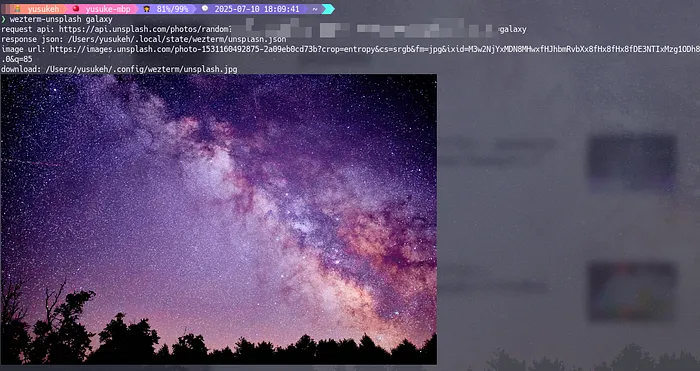
./wezterm-unsplash.sh travel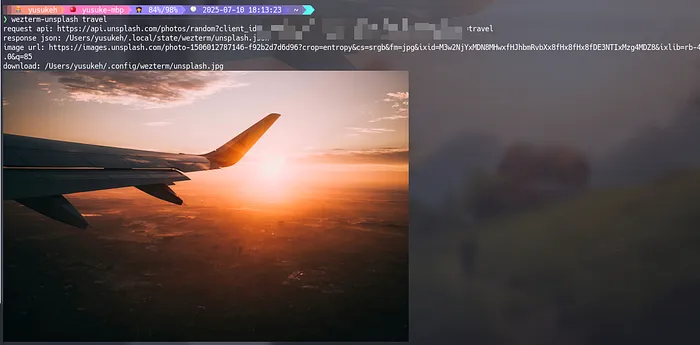
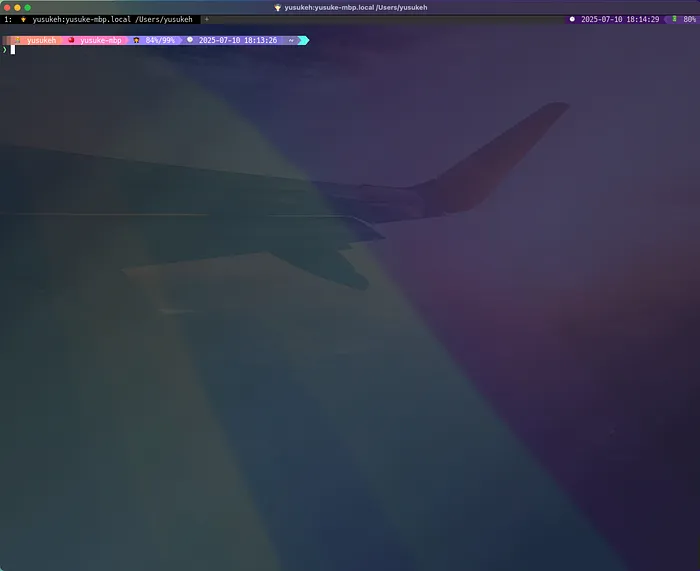
こんな感じになります。
(画像が古いのはMediumにずっとdraftのまま埋もれてました・・・😅)
気分で引数を変えて叩いてます。
背景がばんばん変わるので飽きません。
ターミナル環境について他の記事も書いているので、よろしければこちらもご覧ください!
『ターミナルがダサいとモテない』シリーズ一覧
転載:ターミナルがダサいとモテない。WezTermの背景をUnsplashで変える編。
この記事は Medium(@yusuke_h) からの転載です。
この記事を書いた人