


ターミナルがダサいとモテない。starshipのプロンプトをconfigサブコマンドで設定する編


Photo by Maciej Ruminkiewicz on Unsplash
starship configを使ってstarshipの更新に追従できるようにする。
恵比寿でIT企業をやっているとモテると聞いて創業しましたが早いことありがたいことに10年目に突入した長谷川です。
まだモテる成果は出ていません、、、これからです!(もうめんどくさいのでカウントやめました😆)
starshipはけっこうupdateが活発で最近のupdateにconfigが追従できてなかったのでどうしようかと思ってたところconfigサブコマンドがあったのでこれで一通りの設定を適応できるようにしました。
Starship: Cross-Shell Prompt
Starship is the minimal, blazing fast, and extremely customizable prompt for any shell! Shows the information you need…
starship.rs
starship subcommands
まずstashipのsubcommandsを紹介します。
starship
The cross-shell prompt for astronauts. ☄🌌️

Usage: starship <COMMAND>

Commands:
  bug-report    Create a pre-populated GitHub issue with information about your configuration
  completions   Generate starship shell completions for your shell to stdout
  config        Edit the starship configuration
  explain       Explains the currently showing modules
  init          Prints the shell function used to execute starship
  module        Prints a specific prompt module
  preset        Prints a preset config
  print-config  Prints the computed starship configuration
  prompt        Prints the full starship prompt
  session       Generate random session key
  timings       Prints timings of all active modules
  toggle        Toggle a given starship module
  help          Print this message or the help of the given subcommand(s)

Options:
  -h, --help     Print help
  -V, --version  Print version

NOTE:
    passed arguments: []
subcommand: print-config
starship print-config --help
Prints the computed starship configuration

Usage: starship print-config [OPTIONS] [NAME]...

Arguments:
  [NAME]...  Configuration keys to print

Options:
  -d, --default  Print the default instead of the computed config
  -h, --help     Print help
starshipにはprint-configというサブコマンドがあり、これにdefaultオプションを付けることでデフォルトの設定ファイルを出力することができます。
starship print-config --default今あるconfigをbackupしましょう。
test -f ${HOME}/.config/starship.toml && \
  cp ${HOME}/.config/starship.toml \
  ${HOME}/.config/starship.toml.$(date +%Y%m%d%H%S)

ls -l ${HOME}/.config/starship.*
print-config以下でデフォルトの設定が出力され${HOME}/.config/starship.tomlとして保存されます。
declare config=${HOME}/.config/starship.toml
starship print-config --default > ${config}
subcommand: config
starshipにはconfigというサブコマンドがあり、これでstarship.tomlの要素を上書きできます。
starship config --help
Edit the starship configuration

Usage: starship config [NAME] [VALUE]

Arguments:
  [NAME]   Configuration key to edit
  [VALUE]  Value to place into that key

Options:
  -h, --help  Print help
例えばusernameのshow_alwaysをtrueにセットしたい場合は以下コマンドを入力すれば、設定を変更できるというわけです。
starship config username.show_always truesubcommand: preset
starshipにはpresetというサブコマンドがあり、starshipに組み込まれている基礎的な設定がいくつか登録されています。
Starship: Cross-Shell Prompt
Starship is the minimal, blazing fast, and extremely customizable prompt for any shell! Shows the information you need…
starship.rs
starship preset --help
Prints a preset config

Usage: starship preset [OPTIONS] [NAME]

Arguments:
  [NAME]  The name of preset to be printed [possible values: bracketed-segments, gruvbox-rainbow, jetpack, nerd-font-symbols, no-empty-icons, no-nerd-font, no-runtime-versions, pastel-powerline, plain-text-symbols, pure-preset, tokyo-night]

Options:
  -o, --output <OUTPUT>  Output the preset to a file instead of stdout
  -l, --list             List out all preset names
  -h, --help             Print help
preset list
starship preset --list
bracketed-segments
gruvbox-rainbow
jetpack
nerd-font-symbols
no-empty-icons
no-nerd-font
no-runtime-versions
pastel-powerline
plain-text-symbols
pure-preset
tokyo-night
もちろんこれを使うことでstarshipの設定自体を変更することもできます。
例としては以下でpastel powerlineの出力です。
starship preset pastel-powerline
format = """
[](#9A348E)\
$os\
$username\
[](bg:#DA627D fg:#9A348E)\
$directory\
[](fg:#DA627D bg:#FCA17D)\
$git_branch\
$git_status\
[](fg:#FCA17D bg:#86BBD8)\
$c\
$elixir\
$elm\
$golang\
$gradle\
$haskell\
$java\
$julia\
$nodejs\
$nim\
$rust\
$scala\
[](fg:#86BBD8 bg:#06969A)\
$docker_context\
[](fg:#06969A bg:#33658A)\
$time\
[ ](fg:#33658A)\
"""
# Disable the blank line at the start of the prompt
# add_newline = false
# You can also replace your username with a neat symbol like or disable this
# and use the os module below
[username]
show_always = true
style_user = "bg:#9A348E"
style_root = "bg:#9A348E"
format = '[$user ]($style)'
disabled = false
# An alternative to the username module which displays a symbol that
# represents the current operating system
[os]
style = "bg:#9A348E"
disabled = true # Disabled by default
[directory]
style = "bg:#DA627D"
format = "[ $path ]($style)"
truncation_length = 3
truncation_symbol = "…/"
# Here is how you can shorten some long paths by text replacement
# similar to mapped_locations in Oh My Posh:
[directory.substitutions]
"Documents" = " "
"Downloads" = " "
"Music" = " "
"Pictures" = " "
# Keep in mind that the order matters. For example:
# "Important Documents" = " "
# will not be replaced, because "Documents" was already substituted before.
# So either put "Important Documents" before "Documents" or use the substituted version:
# "Important " = " "
[c]
symbol = " "
style = "bg:#86BBD8"
format = '[ $symbol ($version) ]($style)'
[docker_context]
symbol = " "
style = "bg:#06969A"
format = '[ $symbol $context ]($style)'
[elixir]
symbol = " "
style = "bg:#86BBD8"
format = '[ $symbol ($version) ]($style)'
[elm]
symbol = " "
style = "bg:#86BBD8"
format = '[ $symbol ($version) ]($style)'
[git_branch]
symbol = ""
style = "bg:#FCA17D"
format = '[ $symbol $branch ]($style)'
[git_status]
style = "bg:#FCA17D"
format = '[$all_status$ahead_behind ]($style)'
[golang]
symbol = " "
style = "bg:#86BBD8"
format = '[ $symbol ($version) ]($style)'
[gradle]
style = "bg:#86BBD8"
format = '[ $symbol ($version) ]($style)'
[haskell]
symbol = " "
style = "bg:#86BBD8"
format = '[ $symbol ($version) ]($style)'
[java]
symbol = " "
style = "bg:#86BBD8"
format = '[ $symbol ($version) ]($style)'
[julia]
symbol = " "
style = "bg:#86BBD8"
format = '[ $symbol ($version) ]($style)'
[nodejs]
symbol = ""
style = "bg:#86BBD8"
format = '[ $symbol ($version) ]($style)'
[nim]
symbol = " "
style = "bg:#86BBD8"
format = '[ $symbol ($version) ]($style)'
[rust]
symbol = ""
style = "bg:#86BBD8"
format = '[ $symbol ($version) ]($style)'
[scala]
symbol = " "
style = "bg:#86BBD8"
format = '[ $symbol ($version) ]($style)'
[time]
disabled = false
time_format = "%R" # Hour:Minute Format
style = "bg:#33658A"
format = '[ ♥ $time ]($style)'nerdfontのためmediumでは表示できない文字が含まれています。
自分の場合はpastel powerlineのプロンプトをデフォルト設定に組み込みdraculaのカラーを当てて利用しています。
pastel-powerline dracula
pastel powerlineのdraculaバージョンです。
Dracula Theme
Dracula is a color scheme for code editors and terminal emulators such as Vim, Notepad++, iTerm, VSCode, Terminal.app…
draculatheme.com
Dracula ThemeのサイトにHexがあります。
因みに自分はDracula Proを購入してたりします🤣
以下のような形で名前付き配列として利用します。
declare -A dracula=(
  ["background"]="#282A36"
  ["currentline"]="#44475A"
  ["foreground"]="#F8F8F2"
  ["white"]="#F8F8F2"
  ["comment"]="#6272A4"
  ["cyan"]="#8BE9FD"
  ["green"]="#50FA7B"
  ["orange"]="#FFB86C"
  ["pink"]="#FF79C6"
  ["purple"]="#BD93F9"
  ["red"]="#FF5555"
  ["yellow"]="#F1FA8C"
)
それでは実際に適応していきます。
まずは現在のstarship.tomlをバックアップしてprint-config
test -f ${HOME}/.config/starship.toml && \
  cp ${HOME}/.config/starship.toml \
  ${HOME}/.config/starship.toml.$(date +%Y%m%d%H%S)

ls -l ${HOME}/.config/starship.*

declare config=${HOME}/.config/starship.toml
starship print-config --default > ${config}
基本的なmoduleの設定
starship config aws.disabled true
starship config gcloud.disabled true
starship config username.show_always true
starship config hostname.ssh_only false
starship config status.disabled false
starship config os.disabled false
starship config memory_usage.disabled false
starship config direnv.disabled false
pastel powerlineのpromptの設定
これは自分の設定例です。
$username, $os, $hostname, $memory_usage, $time, $directory, $cmd_durationをpastel powerlineで表示し残りを後ろで表示します。
たまにemoiconがあるのは遊んでるだけ😅
ここは好みの問題だと思うので、自身の設定に適当にカスタマイズしてください。
### pastel powerline
starship config username.format '[🧑💻 $user ]($style)'
starship config username.style_root "bold fg:${dracula['foreground']} bg:${dracula['red']}"
starship config username.style_user "fg:${dracula['foreground']} bg:${dracula['red']}"
starship config os.format '[$symbol]($style)'
starship config os.style "bold fg:${dracula['foreground']} bg:${dracula['pink']}"
starship config hostname.format '[$ssh_symbol$hostname ]($style)'
starship config hostname.style "fg:${dracula['foreground']} bg:${dracula['pink']}"
starship config memory_usage.threshold 0
starship config memory_usage.format '[$symbol $ram_pct(/$swap_pct) ]($style)'
starship config memory_usage.symbol '🧛'
starship config memory_usage.style "fg:${dracula['foreground']} bg:${dracula['purple']}"
starship config time.format '[🕒 $time ]($style)'
starship config time.style "fg:${dracula['foreground']} bg:${dracula['orange']}"
starship config time.time_format '%T'
starship config time.disabled false
starship config directory.truncation_length 10
starship config directory.truncate_to_repo false
starship config directory.format '[$read_only]($read_only_style)[$path ]($style)'
starship config directory.repo_root_format '[$read_only]($read_only_style)[$before_root_path]($before_repo_root_style)[$repo_root]($repo_root_style)[$path ]($style)'
starship config directory.style "fg:${dracula['foreground']} bg:${dracula['comment']}"
starship config directory.read_only_style "fg:${dracula['foreground']} bg:${dracula['comment']}"
starship config directory.truncation_symbol '.../'
starship config cmd_duration.format '[took $duration ]($style)'
starship config cmd_duration.style "fg:${dracula['foreground']} bg:${dracula['cyan']}"
starship config cmd_duration.show_milliseconds true最後にformatを設定します。
# pastel powerline format
declare format=$(cat << EOS
[](fg:${dracula["red"]} bg:none)\\\\
\$username\\\\
[ ](fg:${dracula["red"]} bg:${dracula["pink"]})\\\\
\$os\$hostname\\\\
[ ](fg:${dracula["pink"]} bg:${dracula["purple"]})\\\\
\$memory_usage\\\\
[ ](fg:${dracula["purple"]} bg:${dracula["orange"]})\\\\
\$time\\\\
[ ](fg:${dracula["orange"]} bg:${dracula["comment"]})\\\\
\$directory\\\\
[ ](fg:${dracula["comment"]} bg:${dracula["cyan"]})\\\\
\$cmd_duration\\\\
[ ](fg:${dracula["cyan"]} bg:none)\\\\
\$all
EOS
)
starship config format """${format}"""prompt
ここまでの設定で自分のpromptは以下のようになります。
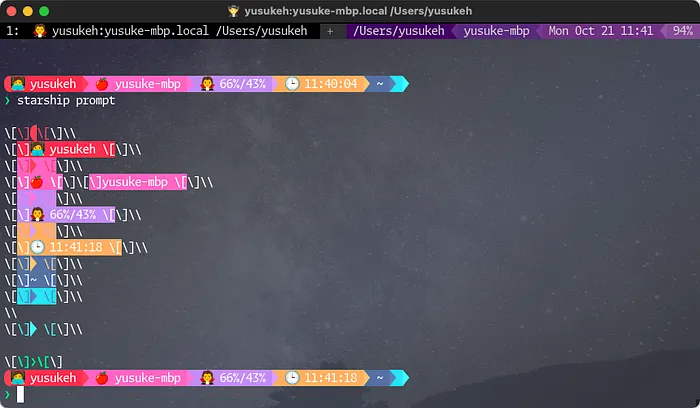
starship prompt
Appendix: palette
starshipにはpaletteというcolor セットを構成することができる設定項目が存在します。
以下の用に設定できます。
starship config palettes.[palette名].[color名] "色コード"
starship config pallete "pallete名"
上記のように設定したら以下のように使えます。
starship config username.style_user "fg:foreground bg:red"ちょっとdracula proを購入しているので色のすべてをここで公開できないため、自分の色に関する設定はもっと複雑なものになっています。
まとめ
これでstarshipのupdateがあってもいつでも最新の追加moduleに追従できて、自分のpromptを設定できるようになりました。
一時はpatchファイルを作るか、templateで何か組まないといけないかと考えていましたが比較的簡単に設定できるようになったので気兼ねなくstarshipのupdateをすることができるようになりました😆
mediumとnerdfontの関係で一部表示されない文字があるけど・・・以下にscriptのまとめを記載しておきます。
# backup starship.toml
test -f ${HOME}/.config/starship.toml && \
cp ${HOME}/.config/starship.toml \
${HOME}/.config/starship.toml.$(date +%Y%m%d%H%S)
# environments
declare config=${HOME}/.config/starship.toml
declare -A dracula=(
["background"]="#282A36"
["currentline"]="#44475A"
["foreground"]="#F8F8F2"
["white"]="#F8F8F2"
["comment"]="#6272A4"
["cyan"]="#8BE9FD"
["green"]="#50FA7B"
["orange"]="#FFB86C"
["pink"]="#FF79C6"
["purple"]="#BD93F9"
["red"]="#FF5555"
["yellow"]="#F1FA8C"
)
# print-config
starship print-config --default > ${config}
# module
starship config aws.disabled true
starship config gcloud.disabled true
starship config username.show_always true
starship config hostname.ssh_only false
starship config status.disabled false
starship config os.disabled false
starship config memory_usage.disabled false
starship config direnv.disabled false
### pastel powerline
starship config username.format '[🧑💻 $user ]($style)'
starship config username.style_root "bold fg:${dracula['foreground']} bg:${dracula['red']}"
starship config username.style_user "fg:${dracula['foreground']} bg:${dracula['red']}"
starship config os.format '[$symbol]($style)'
starship config os.style "bold fg:${dracula['foreground']} bg:${dracula['pink']}"
starship config hostname.format '[$ssh_symbol$hostname ]($style)'
starship config hostname.style "fg:${dracula['foreground']} bg:${dracula['pink']}"
starship config memory_usage.threshold 0
starship config memory_usage.format '[$symbol $ram_pct(/$swap_pct) ]($style)'
starship config memory_usage.symbol '🧛'
starship config memory_usage.style "fg:${dracula['foreground']} bg:${dracula['purple']}"
starship config time.format '[🕒 $time ]($style)'
starship config time.style "fg:${dracula['foreground']} bg:${dracula['orange']}"
starship config time.time_format '%T'
starship config time.disabled false
starship config directory.truncation_length 10
starship config directory.truncate_to_repo false
starship config directory.format '[$read_only]($read_only_style)[$path ]($style)'
starship config directory.repo_root_format '[$read_only]($read_only_style)[$before_root_path]($before_repo_root_style)[$repo_root]($repo_root_style)[$path ]($style)'
starship config directory.style "fg:${dracula['foreground']} bg:${dracula['comment']}"
starship config directory.read_only_style "fg:${dracula['foreground']} bg:${dracula['comment']}"
starship config directory.truncation_symbol '.../'
starship config cmd_duration.format '[took $duration ]($style)'
starship config cmd_duration.style "fg:${dracula['foreground']} bg:${dracula['cyan']}"
starship config cmd_duration.show_milliseconds true
# pastel powerline format
declare format=$(cat << EOS
[](fg:${dracula["red"]} bg:none)\\\\
\$username\\\\
[ ](fg:${dracula["red"]} bg:${dracula["pink"]})\\\\
\$os\$hostname\\\\
[ ](fg:${dracula["pink"]} bg:${dracula["purple"]})\\\\
\$memory_usage\\\\
[ ](fg:${dracula["purple"]} bg:${dracula["orange"]})\\\\
\$time\\\\
[ ](fg:${dracula["orange"]} bg:${dracula["comment"]})\\\\
\$directory\\\\
[ ](fg:${dracula["comment"]} bg:${dracula["cyan"]})\\\\
\$cmd_duration\\\\
[ ](fg:${dracula["cyan"]} bg:none)\\\\
\$all
EOS
)
starship config format """${format}"""ちょっとまぶしい・・・😎
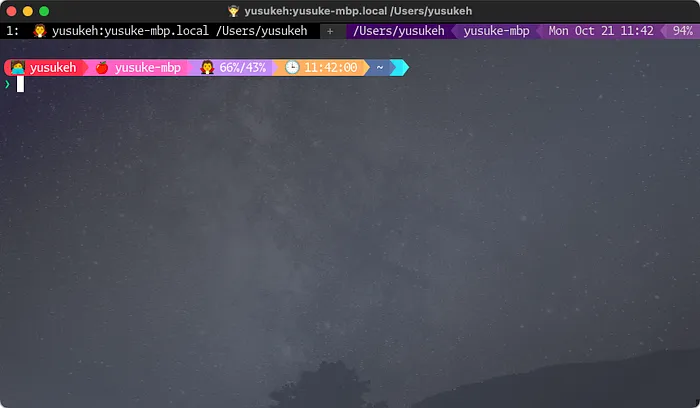
starship pastel powerline dracula
🚀🚀🚀🚀🚀
ターミナル環境について他の記事も書いているので、よろしければこちらもご覧ください!
『ターミナルがダサいとモテない』シリーズ一覧
転載:ターミナルがダサいとモテない。starshipのプロンプトをconfigサブコマンドで設定する編
この記事は Medium(@yusuke_h) からの転載です。
この記事を書いた人