


ターミナルがダサいとモテない。NeovimでMarkdown-ToC編


Photo by frame harirak on Unsplash
markdown-tocがauto updateしたら便利
恵比寿でIT企業をやっているとモテると聞いて創業しましたが早いことありがたいことに10年目に突入した長谷川です。
まだモテる成果は出ていません、、、これからです!(もうめんどくさいのでカウントやめました😆)
Neovimでmarkdown表示しながらでmermaidも表示はこちらを見ていただくとして・・・
ターミナルがダサいとモテない。mermaidを表示するぞ編(NeoVim+AstroNvim v4)
あなたのNeoVimはmermaidを表示できますか?
medium.com
今回はMarkdown-ToCです。
Markdownを書くときToCが自動で更新されると便利です。
このpluginを使います。
GitHub - hedyhli/markdown-toc.nvim: Generate and auto-update table of contents list for markdown
Generate and auto-update table of contents list for markdown - hedyhli/markdown-toc.nvim
github.com
Install
ほぼ上記のRepositoryのREADMEのままですが😅
~/.config/nvim/lua/plugins/my-markdown-toc-nvim.lua
return {
  "hedyhli/markdown-toc.nvim",
  ft = "markdown", -- Lazy load on markdown filetype
  cmd = { "Mtoc" }, -- Or, lazy load on "Mtoc" command
  opts = {
    -- Your configuration here (optional)
    headings = {
      -- Include headings before the ToC (or current line for `:Mtoc insert`)
      before_toc = false,
      -- Either list of lua patterns (regex),
      -- or a function that takes a heading title and returns boolean (true means
      -- to EXCLUDE heading).
      exclude = {},
      -- The first capture is for heading level ('###') and second is for the heading
      -- title.
      pattern = "^(#+)%s+(.+)$",
    },

    -- Config relating to the style and format of the ToC
    toc_list = {
      -- string or list of strings (for cycling)
      -- If cycle_markers = false and markers is a list, only the first is used.
      -- You can set to '1.' to use a automatically numbered list for ToC (if
      -- your markdown render supports it).
      markers = "*",
      cycle_markers = false,
      -- Example config for cycling markers:
      ----- markers = {'*', '+', '-'},
      ----- cycle_markers = true,

      -- Integer or a function that returns an integer.
      -- If function, it is called every time the ToC is regenerated. This allows the use
      -- of retrieving buffer-local settings like shiftwidth.
      indent_size = 2,

      -- Remove the ${indent} below, or set indent_size=0 to have the whole ToC
      -- be a flattened list.
      item_format_string = "${indent}${marker} [${name}](#${link})",

      ---Formatter for a single ToC list item.
      -- `item_info` has fields `name`, `link`, `marker`, `indent`, To change the
      -- format of each heading item but keep the same field substitution syntax,
      -- simply change `item_format_string`.
      ---@param item_info table Information for current heading item.
      ---@param fmtstr string from `item_format_string` config
      ---@return string formatted_item
      item_formatter = function(item_info, fmtstr)
        local s = fmtstr:gsub([[${(%w-)}]], function(key) return item_info[key] or ("${" .. key .. "}") end)
        return s
      end,
    },

    -- Table or boolean. Set to true to use these defaults, set to false to disable completely.
    -- Fences are needed for the update/remove commands.
    fences = {
      enabled = true,
      -- These fence texts are wrapped within "<!-- % -->", where the '%' is
      -- substituted with the text.
      start_text = "mtoc-start",
      end_text = "mtoc-end",
      -- An empty line is inserted on top and below the ToC list before the being
      -- wrapped with the fence texts, same as vim-markdown-toc.
    },

    -- Set auto_update=true to use the following defaults.
    -- Set to false to disable completely.
    -- Fields events and pattern are used unprocessed for creating autocmds.
    auto_update = {
      enabled = true,
      -- This allows the ToC to be refreshed silently on save for any markdown file.
      -- The refresh operation uses `Mtoc update` and does NOT create the ToC if
      -- it does not exist.
      events = { "BufWritePre" },
      pattern = "*.{md,mdown,mkd,mkdn,markdown,mdwn}",
    },
  },
}
Usage
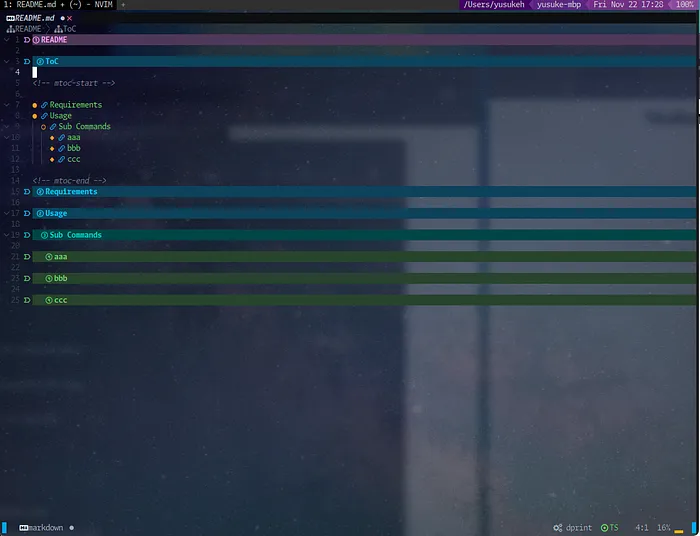
以下のようなサンプルのREADME.mdを作ります。
# README

## ToC

## Requirements

## Usage

### Sub Commands

#### aaa

#### bbb

#### ccc
ToCの下あたりにカーソルを合わせて・・・
おもむろに以下のコマンドをNeovimに叩き込むと

:Mtoc iToCが自動生成されて挿入されます😆
Auto Update

こんな感じで新しいセクションを追加してNormalモードに抜けて保存すると・・・
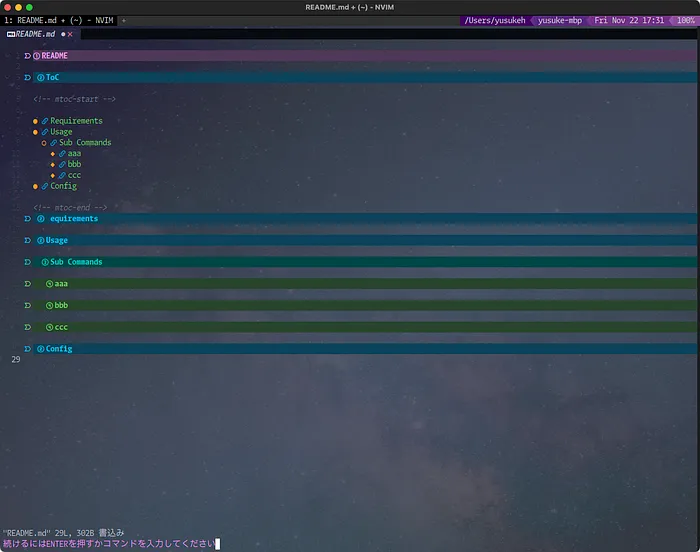
ToCに新しくConfigが追加されます。
先ほど書きましたが以下の設定が必要です。
    -- Table or boolean. Set to true to use these defaults, set to false to disable completely.
    -- Fences are needed for the update/remove commands.
    fences = {
      enabled = true,
      -- These fence texts are wrapped within "<!-- % -->", where the '%' is
      -- substituted with the text.
      start_text = "mtoc-start",
      end_text = "mtoc-end",
      -- An empty line is inserted on top and below the ToC list before the being
      -- wrapped with the fence texts, same as vim-markdown-toc.
    },

    -- Set auto_update=true to use the following defaults.
    -- Set to false to disable completely.
    -- Fields events and pattern are used unprocessed for creating autocmds.
    auto_update = {
      enabled = true,
      -- This allows the ToC to be refreshed silently on save for any markdown file.
      -- The refresh operation uses `Mtoc update` and does NOT create the ToC if
      -- it does not exist.
      events = { "BufWritePre" },
      pattern = "*.{md,mdown,mkd,mkdn,markdown,mdwn}",
    },
これでとってもREADME.mdが書きやすくなりました。
これなしではもう書けない😂
ターミナル環境について他の記事も書いているので、よろしければこちらもご覧ください!
『ターミナルがダサいとモテない』シリーズ一覧
転載:ターミナルがダサいとモテない。NeovimでMarkdown-ToC編
この記事は Medium(@yusuke_h) からの転載です。
この記事を書いた人