


ターミナルがダサいとモテない。uv で python の管理をする編


python を何で管理してますか?

Photo by Lukasz Szmigiel on Unsplash
Unsplash に Python って入れたらこうなるわな w
ヘビきらいだったらすいません
恵比寿で IT 企業をやっているとモテると聞いて創業しましたが早いことありがたいことに 10 年目に突入した長谷川です。
まだモテる成果は出ていません、、、これからです!(もうめんどくさいのでカウントやめました)
Python の Install 手法はとってもたくさんあります。
実は自分は最近 Python をちょっと書けるようになったので poetry からの User です。
もちろんインフラエンジニアとしては pyenv と pyenv-virtualenv などで virtualenv を構成したりして管理をしてきています。
少し昔なら supervisor とかはいわゆる Super Daemon で有名だったし、そりゃあ使っています。
uv
GitHub の Readme の紹介にこう書かれています。
GitHub - astral-sh/uv: An extremely fast Python package and project manager, written in Rust.
-
A single tool to replace
pip,pip-tools,pipx,poetry,pyenv,virtualenv, and more. -
10–100x faster than
pip. -
Installs and manages Python versions.
-
Runs and installs Python applications.
-
Runs single-file scripts, with support for inline dependency metadata.
-
Provides comprehensive project management, with a universal lockfile.
-
Includes a pip-compatible interface for a performance boost with a familiar CLI.
-
Supports Cargo-style workspaces for scalable projects.
-
Disk-space efficient, with a global cache for dependency deduplication.
-
Installable without Rust or Python via
curlorpip. -
Supports macOS, Linux, and Windows.
pip と pip-tools と pipx と poetry と pyenv と virtualenv ってめっちゃ多機能です w
私は実際に rye を 1 年くらい使っていて、先日 uv に切り替えて特に macOS 内で問題もないのでそのまま uv を利用しています。
rust
uv の Install には rust と cargo が必要なのでまず rust を Setup します。
因みに homebrew にもありますが、社員と会話していて brew で update されちゃうよりは自分で明確に管理した方が良いって話が出て、自分も同じ意見です。
まああまり気にしない人は brew で一発Install で良いと思います。
brew install uvInstall rustup
rustup を Install します。
curl --proto '=https' --tlsv1.2 -sSf https://sh.rustup.rs | sh自分は RUSTUP_HOME/CARGO_HOME が .rust になるのが嫌なので環境変数を設定しています
### rustup
declare -x RUSTUP_HOME="${HOME}/rust"
if [ -d ${RUSTUP_HOME} ]; then
  declare -x CARGO_HOME="${RUSTUP_HOME}"
  declare -x CARGO_INSTALL_ROOT="${RUSTUP_HOME}"
  declare -x CARGO_TARGET_DIR=${CARGO_HOME}/target
  declare -x MACOSX_DEPLOYMENT_TARGET=$(sw_vers | rg ProductVersion | choose 1 | choose --field-separator "\." 0)
  declare -x CARGO_FEATURE_OPENSSL_SRC=1
  declare -x CARGO_FEATURE_VENDORED=1
  declare -x RUSTENV_VERSION=$(${RUSTUP_HOME}/bin/rustc --version | awk '{print $2}')
  if [ -f ${RUSTUP_HOME}/env ]; then
    source ${RUSTUP_HOME}/env
  fi
  eval "$(rustup completions $(basename ${SHELL}))"
  eval "$(rustup completions $(basename ${SHELL}) cargo)"
  declare -x RUSTUP_TOOLCHAIN=$(rustup toolchain list | rg "^(\w+)-\w+-\w+-\w+\s\(default\).?*$" --replace '$1')
fi
ちょっとかなり前に設定しているので、Rust の Version でいろいろな変化があって、たった今この瞬間の環境変数的に何が正しいのかよくわからない www
openssl の絡みで rustup でいろいろトラブルがあったりとかする時代が・・・
そして RUSTUP_TOOLCHAIN に ripgrep を使ってしまっている w
みなさんはオレよりゴリゴリにできると思うので、うまいことやってください(無責任)
Install がうまくいくと .bashrc などに変更が入るんじゃないかなぁ・・・
rustup update
rustup self update
stable channel を使えば良いと思います。
rustup toolchain install stable-aarch64-apple-darwin
rustup default stable-aarch64-apple-darwin
cargo が入ったか確認
which cargoこれで uv の Install が開始できます。
Install uv
ここまでくれば uv の Install は簡単です。
GitHub - astral-sh/uv: An extremely fast Python package and project manager, written in Rust.
curl -LsSf https://astral.sh/uv/install.sh | shここでも自分は .uv に入るのが嫌で環境変数をめっちゃ入れています。(自己責任で w)
# uv
if [ -x ${RUSTUP_HOME}/bin/uv ]; then
  # Environment variables
  # https://docs.astral.sh/uv/configuration/environment/
  declare -x UV_HOME=${HOME}/uv
  declare -x UV_CACHE_DIR=${UV_HOME}/cache
  declare -x UV_TOOL_DIR=${UV_HOME}/tools
  declare -x UV_TOOL_BIN_DIR=${UV_HOME}/bin
  declare -x UV_PYTHON_INSTALL_DIR=${UV_HOME}/python
  declare -x UV_SYSTEM_PYTHON=false
  eval "$(uv generate-shell-completion $(basename ${SHELL}))"
  # added uv tool path
  PATH="$(uv tool dir --bin):$PATH"
fi
uv help
何か新しい Command いれたら、まず Help みましょう。
40~50 代の Unix系を知ってるエンジニアに怒られます w
uv help

An extremely fast Python package manager.

Usage: uv [OPTIONS] <COMMAND>

Commands:
  run                        Run a command or script
  init                       Create a new project
  add                        Add dependencies to the project
  remove                     Remove dependencies from the project
  sync                       Update the project's environment
  lock                       Update the project's lockfile
  export                     Export the project's lockfile to an alternate format
  tree                       Display the project's dependency tree
  tool                       Run and install commands provided by Python packages
  python                     Manage Python versions and installations
  pip                        Manage Python packages with a pip-compatible interface
  venv                       Create a virtual environment
  build                      Build Python packages into source distributions and wheels
  publish                    Upload distributions to an index
  cache                      Manage uv's cache
  self                       Manage the uv executable
  version                    Display uv's version
  generate-shell-completion  Generate shell completion
  help                       Display documentation for a command

Cache options:
  -n, --no-cache               Avoid reading from or writing to the cache, instead using a temporary directory for the duration of the
                               operation [env: UV_NO_CACHE=]
      --cache-dir <CACHE_DIR>  Path to the cache directory [env: UV_CACHE_DIR=/Users/yusukeh/uv/cache]

Python options:
      --python-preference <PYTHON_PREFERENCE>  Whether to prefer uv-managed or system Python installations [env: UV_PYTHON_PREFERENCE=]
                                               [possible values: only-managed, managed, system, only-system]
      --no-python-downloads                    Disable automatic downloads of Python. [env: "UV_PYTHON_DOWNLOADS=never"]

Global options:
  -q, --quiet                      Do not print any output
  -v, --verbose...                 Use verbose output
      --color <COLOR_CHOICE>       Control colors in output [default: auto] [possible values: auto, always, never]
      --native-tls                 Whether to load TLS certificates from the platform's native certificate store [env: UV_NATIVE_TLS=]
      --offline                    Disable network access
      --no-progress                Hide all progress outputs
      --directory <DIRECTORY>      Change to the given directory prior to running the command
      --project <PROJECT>          Run the command within the given project directory
      --config-file <CONFIG_FILE>  The path to a `uv.toml` file to use for configuration [env: UV_CONFIG_FILE=]
      --no-config                  Avoid discovering configuration files (`pyproject.toml`, `uv.toml`) [env: UV_NO_CONFIG=]
  -h, --help                       Display the concise help for this command
  -V, --version                    Display the uv version

Use `uv help <command>` for more information on a specific command.
rye 使ってる人だとすんなり入ると思います。
ただ rye みたいに default で使う python を構成する機能は現時点では無いみたい。
自分も使い始めてるけどそれほど現時点では困らないかな。
ちょっと昔、うちも Google Cloud を使い始めて 10 年になるから、知ってる人は知ってると思いますが、一時期 macOS の Python と gcloud がちょっと問題になる状況があってその時は Python を指定して動かしたりしてた時期がある。
そういうパターンだとちょっと困るかもしれないけど、まあ困ったら困ったで別途考えればいいんじゃないかなと
uv tool
uv は rye と同じで Project Directory の管理をするのが主目的ですが、それを紹介している blog がたくさんあるので自分のは割愛します。
python でコマンドラインツールを入れたくなると思います。
ansible とか jupyterlab とかいろいろあるんじゃないかなぁ・・・
uv tool install [pypi package name]で Install できます。
uv tool install ansible自分のはこんな感じです。
uv tool list

ansible v10.4.0
- ansible-community
ansible-shell v0.0.5
- ansible-shell
gptme v0.19.2
- gptme
- gptme-eval
- gptme-server
jupyterlab v4.2.5
- jlpm
- jupyter-lab
- jupyter-labextension
- jupyter-labhub
litellm v1.48.18
- litellm
mackup v0.8.41
- mackup
magika v0.5.1
- magika
pip v24.2
- pip
- pip3
- pip3.12
pyinfra v3.1.1
- pyinfra
rich-cli v1.8.0
- rich
ruff v0.6.9
- ruff
slack-export-viewer v1.4.4
- slack-export-viewer
- slack-export-viewer-cli
sqlfluff v3.2.2
- sqlfluff
mackup は macOS の Backup とか管理とかに使ってます。
Python を書くと自分の場合、ほぼ業務的にも CLI系のツールになるけど
Typer と Rich がめっちゃ好きで
その rich から rich-cli が出たのでそりゃ入れますとも
Appendix: rich-cli
rich-cli を紹介するにあたってちょっとデータが必要なので dummyjson.com をサンプルにさせて頂きましょう。
DummyJSON - Free Fake REST API for Placeholder JSON Data
products っていう Sample JSON があるのでそれを使わせて貰います
curl -sl https://dummyjson.com/products | jq .jq を使うと json が見えると思います。
ちょっと適当な値をかき集めて csv 化
curl -s -l https://dummyjson.com/products \
  | jq -r ".products[] | [.id, .title, .category, .price] | @csv"
こんなデータが返って来ます。
1,"Essence Mascara Lash Princess","beauty",9.99
2,"Eyeshadow Palette with Mirror","beauty",19.99
3,"Powder Canister","beauty",14.99
4,"Red Lipstick","beauty",12.99
5,"Red Nail Polish","beauty",8.99
6,"Calvin Klein CK One","fragrances",49.99
7,"Chanel Coco Noir Eau De","fragrances",129.99
8,"Dior J'adore","fragrances",89.99
9,"Dolce Shine Eau de","fragrances",69.99
10,"Gucci Bloom Eau de","fragrances",79.99
11,"Annibale Colombo Bed","furniture",1899.99
12,"Annibale Colombo Sofa","furniture",2499.99
13,"Bedside Table African Cherry","furniture",299.99
14,"Knoll Saarinen Executive Conference Chair","furniture",499.99
15,"Wooden Bathroom Sink With Mirror","furniture",799.99
16,"Apple","groceries",1.99
17,"Beef Steak","groceries",12.99
18,"Cat Food","groceries",8.99
19,"Chicken Meat","groceries",9.99
20,"Cooking Oil","groceries",4.99
21,"Cucumber","groceries",1.49
22,"Dog Food","groceries",10.99
23,"Eggs","groceries",2.99
24,"Fish Steak","groceries",14.99
25,"Green Bell Pepper","groceries",1.29
26,"Green Chili Pepper","groceries",0.99
27,"Honey Jar","groceries",6.99
28,"Ice Cream","groceries",5.49
29,"Juice","groceries",3.99
30,"Kiwi","groceries",2.49
これをおもむろに rich-cli の csv input に食わせると・・・
curl -s -l https://dummyjson.com/products | \
  jq -r ".products[] | [.id, .title, .category, .price] | @csv" | \
  rich --csv -
じゃじゃーーん w
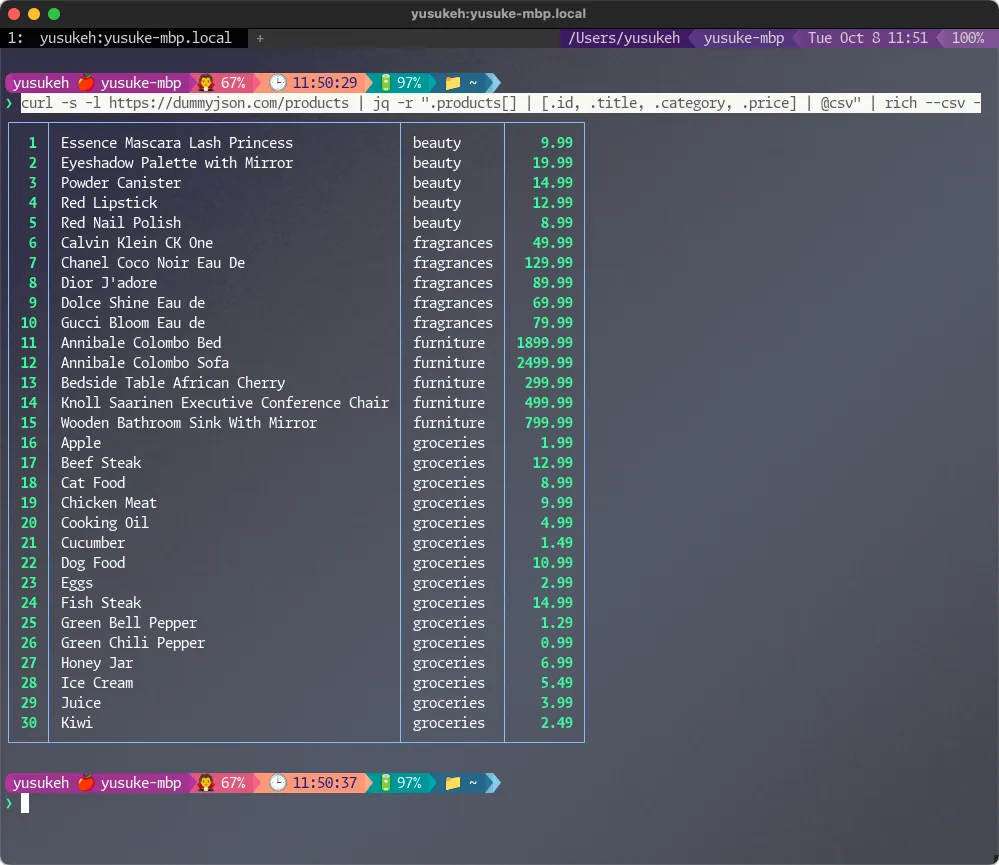
綺麗に出力されました!
rye の方が shebang の問題とかも解決方法があって、もうちょっと待ったら uv で現時点の課題がすべて解決するかも
普段使いには全く困りません。
ターミナル環境について他の記事も書いているので、よろしければこちらもご覧ください!
『ターミナルがダサいとモテない』シリーズ一覧
この記事を書いた人