


ターミナルがダサいとモテない。glanceでpersonal dashboard

Photo by Luke Chesser on Unsplash
なんだか大昔のiGoogleを思い出してしまう自分はオジサンかもしれない・・・
Unsplashにdashboardと入れたらこんなTop画像になってしまった🤣
ちょっと違うけど気にしないで進めます。
恵比寿でIT企業をやっているとモテると聞いて創業しましたが、ありがたいことに11年目に突入した長谷川です。
最近の個人ネタは、GeForce NowとKEFのスピーカーです。
GeForce Now
巷はnVidiaのGeForce50XXで話題ですが、私は年末にGeForce Nowの契約ができたので、最近はDiablo4をやっています。
Diablo4はスピリットボーンでトーナメント2まで来ました。一段階難易度を上げたら敵が10倍くらい固くなってドン引きしてます。ただDiablo2の頃の地獄と比べたら余裕ですね。
ダメージをすべて毒に変換し10秒間にわたって分散する手袋を手に入れ世界が変わりました。
指輪に 豪奢なエメラルド(毒耐性+60%)を2個はめたので、死ぬことがほぼあり得ない状態になりました。
死ぬことがほぼあり得ない状態と言っていますが、そこはもちろんDiabloなので気を抜くと瞬殺されます😂
今回GeForce Nowのために新型のiPad miniを購入して、コントローラはRazer Kishi Ultraをはめてやっています。
Diablo4に飽きたら、次はCyberpunk 2077をfull bundleで購入済みなので未来に行きます。
GeForce Nowはすごいですね。
やるゲームが基本的にはソロ系なのでラグもとくに気にならないし、何よりモバイル端末でいつでもどこでもソファでもベッドでも重厚長大なPCゲームができるので夜も眠れません・・・🤣
nVidiaさん来年から始まる100時間制限やめてください!😅
KEF
中島くんがシアターシステムを組んでやたらと勧めてくるので、4ヶ月くらい悩んで購入しました。
最初は自宅のTVがBRAVIAなのでSony BRAVIA Theatre Quad HT-A9M2を購入検討してたんですが、YouTubeやらいろいろ調べていてスタンドが無いためやめました。
リヤスピーカーの置き場所が無いのです!
床においても問題だし、スタンドにおいても不安定だし、DIYしたくないし・・・
いろいろ悩んだ挙げ句、KEF Music Gallery Tokyoに突撃して、購入してしまった・・・😅
Active Speakerを購入したのでBRAVIAからeARCで接続して映画観たり、AirPlayで音楽聴いたりしてます。
音も含めた全体的な感想は、
- 素直?フラットな音質(ドンシャリじゃない!)
- 広がりある音場
- タイトかつ余力のある低域
- 安定した定位
- 分離の良さ
- キャビネットの剛性
- 低音の床振動の無さ
さすが有名なスピーカーメーカーだなと思いました。
音量も50を超えたあたりから一気に抜けが良くなるので常用域でギリギリ鳴らせるスピーカーかもなという印象
ちょっと60あたりから、マンションではあんまり現実的じゃないけど😅
先日届いてまだ数日しか過ごしてませんが、音響はQoLを上げてくれるなと思い始めてます。
デスクにも欲しくなってしまいました・・・
Glance
めちゃくちゃ脱線(まえがき長えよ)しましたが、今回はwebで散歩していたら見つけたglanceを紹介します。
README.mdにわかりやすい説明がなくて、ページのscreenshotだけなので簡単に自分の勘層を書くと
yamlで定義できる、いろんなwidgetsのあるPersonal Dashboardです。
GitHub - glanceapp/glance: A self-hosted dashboard that puts all your feeds in one place
A self-hosted dashboard that puts all your feeds in one place - glanceapp/glance
github.com
サブタイトルにも書きましたが、自分はオジサンなので大昔のiGoogleを思い出してしまうのですが、iGoogleを知ってたらあなたもオジサンです🤣
Install
GitHub - glanceapp/glance: A self-hosted dashboard that puts all your feeds in one place
A self-hosted dashboard that puts all your feeds in one place - glanceapp/glance
github.com
ここにいろいろあります。
自分の場合は go installを試したらInstallできたのでそれで動かしてます。
go install github.com/glanceapp/glance@latestgo installはgoのversionやタイミング次第でInstallできないとかあると思うのでdocker使うのが一番良いかもです😅
Preconfigured pages
ConfigurationをすっとばしてPreconfigured pagesを見てみましょう。
glance/docs/preconfigured-pages.md at main · glanceapp/glance
A self-hosted dashboard that puts all your feeds in one place - glance/docs/preconfigured-pages.md at main ·…
github.com
こちらを見ていただくとわかるのですが、いろんな用途にカスタマイズされたページの紹介がされています。
こんな感じでwidgetsを自由に選択して自由に設定していろいろな用途でpageを構成できます。
Command Help
glance commandのHelpを先に確認しておきましょう。
glance --help
Usage: glance [options] command

Options:
  -config string
        Set config path (default "glance.yml")

Commands:
  config:validate     Validate the config file
  config:print        Print the parsed config file with embedded includes
  diagnose            Run diagnostic checks
ええええええ!!!
mediumのCode BlockのSyntaxがめっちゃ増えてる😂
前はこんな無かったのに!
まあ気を取り直して
-configでyamlを指定- sub-command
config:validateで検証 - sub-command
config:printでconfigの全体出力 - sub-command
diagnoseでconfigの診断
てな具合です。
config:print が気になるかもしれません。
Configurationのときに説明しますが、glanceは独自に !include を使うことで外部のyamlを読み込むことができます。
config:validate の出力がその外部のyamlを読み込んだ結合状態のyamlなのでErrorの行数を教えてくれるのですが、config:print がないと無理です😅
sub-command diagnose
こんな出力をしてくれます。
widgetsのそれぞれのすごく簡単なdebug出力みたいなものを確認することができます。
glance -config ${XDG_CONFIG_HOME}/glance/glance.yaml diagnose
```
Glance version: dev
Go version: go1.24.1
Platform: darwin / arm64 / 8 CPUs
In Docker container: no

Checking network connectivity, this may take up to 10 seconds...

✓ Can resolve cloudflare.com through Cloudflare DoH | 260 bytes, {"Status":0,... | 31ms
✓ Can resolve cloudflare.com through Google DoH | 304 bytes, {"Status":0,... | 58ms
✓ Can resolve github.com | ... | 20ms
✓ Can resolve reddit.com | ... | 20ms
✓ Can resolve twitch.tv | ... | 18ms
✓ Can fetch data from YouTube RSS feed | 37104 bytes, ... | 347ms
✓ Can fetch data from Twitch.tv GQL | 0 bytes | 154ms
✓ Can fetch data from GitHub API | 2262 bytes, ... | 215ms
✓ Can fetch data from Open-Meteo API | 3328 bytes, {"results":[{"id":2643743,"name":"London","latitud... | 760ms
✓ Can fetch data from Reddit API | 134 bytes, ... | 257ms
✗ Can't fetch data from Yahoo finance API | 23 bytes, ...| 40ms
└╴ error: expected status code 200, got 429
✓ Can fetch data from Hacker News Firebase API | 4501 bytes, ... | 332ms
✓ Can fetch data from Docker Hub API | 4260 bytes, | 602ms
```
Yahoo finance APIがToo Many RequestでError出してますね
実際の出力はデータの先頭が含まれてます。
Configuration
glance/docs/configuration.md at main · glanceapp/glance
A self-hosted dashboard that puts all your feeds in one place - glance/docs/configuration.md at main · glanceapp/glance
github.com
さっそくPageを作っていきましょう。
ちょっとソースコードも調べてみたんですが、 XDG_CONFIG_HOME 配下にといったような環境変数などからconfigのdefault pathは無いみたいです。
current directoryの glance.ymlを見に行くみたいです。
自分は XDG_CONFIG_HOME にある glance にdirectoryを作って配置することにしました。
ちょっと注意なのですが、XDG_CONFIG_HOMEを指定してるかどうかで変わってしまうので以下のコマンドでは、直接指定してます。
mkdir ~/.config/glancedirectoryを作成したら移動してsampleのpreconfigure fileをdownloadしましょう。
sampleの glance.yml はここにあります。
cd ~/.config/glance
curl -o glance.yml \
  https://raw.githubusercontent.com/glanceapp/glance/refs/heads/main/docs/glance.yml
このsampleの glance.yml を元にして進めていきます。
glance.yml
glance.yml の大まかな構成要素を説明します。
glance/docs/configuration.md at main · glanceapp/glance
A self-hosted dashboard that puts all your feeds in one place - glance/docs/configuration.md at main · glanceapp/glance
github.com
pages
glance/docs/configuration.md at main · glanceapp/glance
A self-hosted dashboard that puts all your feeds in one place - glance/docs/configuration.md at main · glanceapp/glance
github.com
実際にconfiguration.mdを見るとわかりますが、 pagesにlistでnameを入れるとページ上部のpageを増やせます。
pages:
  - name: Home
    columns: ...

  - name: Videos
    columns: ...

  - name: Homelab
    columns: ...
columns
glance/docs/configuration.md at main · glanceapp/glance
A self-hosted dashboard that puts all your feeds in one place - glance/docs/configuration.md at main · glanceapp/glance
github.com
columnsにlistで size を定義することでページカラムを増やすことができます。ここでは3個までみたいですね。(3個以上はやってないのでわかりません。)
size には small と full があるようです。
widgets
glance/docs/configuration.md at main · glanceapp/glance
A self-hosted dashboard that puts all your feeds in one place - glance/docs/configuration.md at main · glanceapp/glance
github.com
ページのコンポーネントになります。
Widgetsはとてもたくさん用意されています。
以下のTop of ContentsのWidgetsの一覧を確認してください。
glance/docs/configuration.md at main · glanceapp/glance
A self-hosted dashboard that puts all your feeds in one place - glance/docs/configuration.md at main · glanceapp/glance
github.com
自分はsampleの glance.yml の3 columns構成で進めます。
pages:
  - name: Home
    columns:
      - size: small
        widgets:
          # ... 省略 ...
      - size: full
        widgets:
          # ... 省略 ...
      - size: small
        widgets:
          # ... 省略 ...
Preview
それでは自分のglanceのpreviewをしてみます。
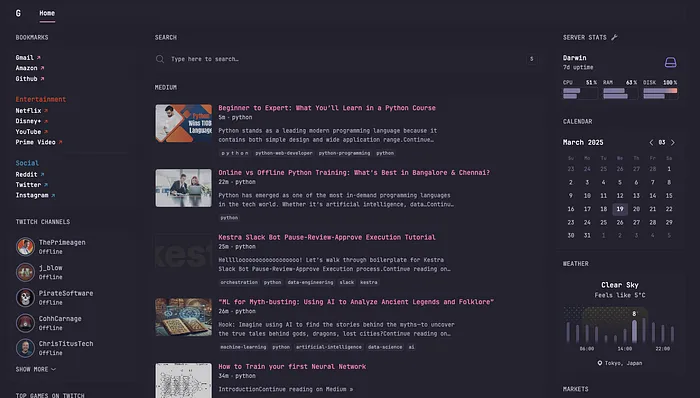
この自分のdashboardで構成されている要素を一部紹介していきます。
bookmarks
将来的にpageが増えたら困りそうなのでincludeを活用して、 Page: Homeのwidgetsは home というdirectoryにまとめていきます。
mkdir ~/.config/glance/home
cd ~/.config/glance/home
bookmarks.yaml
名前の通りで、列挙したbookmarkを一覧表示するwidgetです。
glance/docs/configuration.md at main · glanceapp/glance
A self-hosted dashboard that puts all your feeds in one place - glance/docs/configuration.md at main · glanceapp/glance
github.com
自分のyamlも一旦コピーで対応してちょっと追加したりとかしています。
- type: bookmarks
  groups:
    - links:
        - title: Gmail
          url: https://mail.google.com/mail/u/0/
        - title: Amazon
          url: https://www.amazon.com/
        - title: Github
          url: https://github.com/
        - title: BitBucket
          url: https://bitbucket.org/
    - title: Entertainment
      color: 10 70 50
      links:
        - title: Netflix
          url: https://www.netflix.com/
        - title: Disney+
          url: https://www.disneyplus.com/
        - title: YouTube
          url: https://www.youtube.com/
        - title: Prime Video
          url: https://www.primevideo.com/
    - title: Social
      color: 200 50 50
      links:
        - title: Reddit
          url: https://www.reddit.com/
        - title: Twitter
          url: https://twitter.com/
        - title: Instagram
          url: https://www.instagram.com/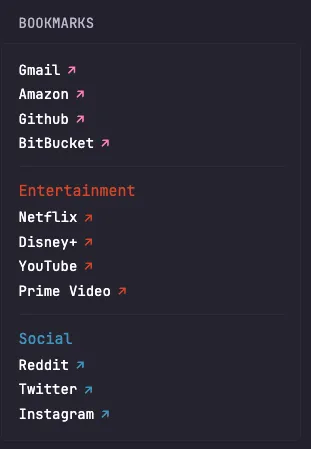
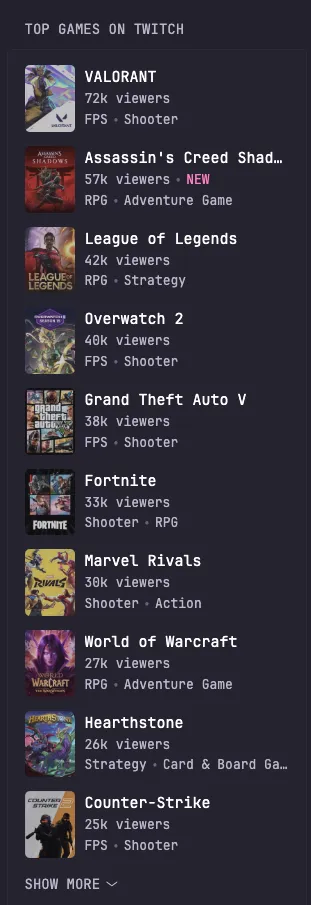
Twitch top games
これも名前の通りですね
glance/docs/configuration.md at main · glanceapp/glance
A self-hosted dashboard that puts all your feeds in one place - glance/docs/configuration.md at main · glanceapp/glance
github.com
twitch-top-games.yaml
コピペでlimitとか折りたたみの数を調整しました。
- type: twitch-top-games
  limit: 20
  collapse-after: 10
  exclude:
    - just-chatting
    - pools-hot-tubs-and-beaches
    - music
    - art
    - asmr
個人的に・・・無料ゲームばっかがTop Rankにいるのが納得いかない🤣
Search
センターの上部にGoogle検索を配置しました。
search.yaml
- type: search
  search-engine: google
Medium
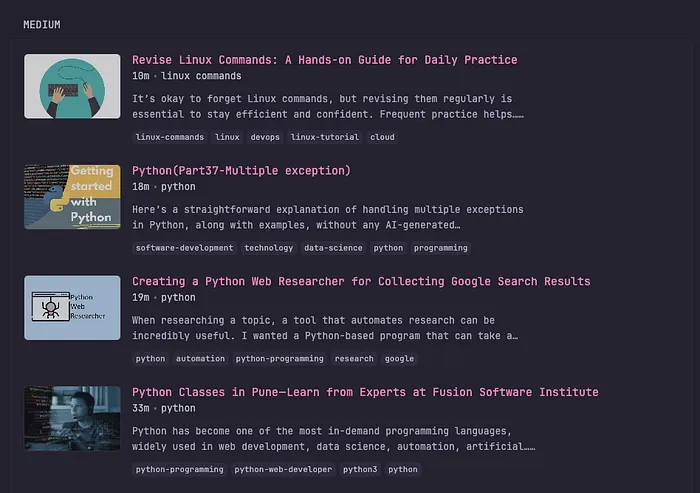
Mediumも取り込んでみました。
RSS widgetがあるのでそれを利用しています。
glance/docs/configuration.md at main · glanceapp/glance
A self-hosted dashboard that puts all your feeds in one place - glance/docs/configuration.md at main · glanceapp/glance
github.com
medium.yaml
- type: rss
  title: medium
  style: detailed-list
  limit: 10
  collapse-after: 20
  cache: 10m
  feeds:
    - url: https://medium.com/feed/@yusuke_h
      title: yusuke_h
    - url: https://medium.com/feed/tag/linux
      title: linux
    - url: https://medium.com/feed/tag/neovim
      title: neovim
    - url: https://medium.com/feed/tag/python
      title: python
    - url: https://medium.com/feed/tag/rust
      title: rust
    - url: https://medium.com/feed/tag/golang
      title: golang
    - url: https://medium.com/feed/tag/linux-commands
      title: linux commands
    - url: https://medium.com/feed/tag/network-security
      title: network security
自分のmediumはもっとフォローしているんですが途中で心が折れました🤣
hacker-news & robsters split-column
glanceにはsplit-columnというtypeがあり、大きな意味でpagesに宣言するcolumnsとは別で個別にカラム化出来ます。
ここではhacker-newsとrobstersをそれぞれsplit-columnで表示しています。
glance.yaml
# ... 省略 ...
          - type: split-column
            widgets:
              !include: home/hacker-news.yaml
              !include: home/robsters.yaml
# ... 省略 ...
こんな感じで
hacker-news.yaml
glance/docs/configuration.md at main · glanceapp/glance
A self-hosted dashboard that puts all your feeds in one place - glance/docs/configuration.md at main · glanceapp/glance
github.com
- type: hacker-news
  limit: 20
  collapse-after: 10
robsters.yaml
glance/docs/configuration.md at main · glanceapp/glance
A self-hosted dashboard that puts all your feeds in one place - glance/docs/configuration.md at main · glanceapp/glance
github.com
- type: lobsters
  sort-by: hot
  limit: 20
  collapse-after: 10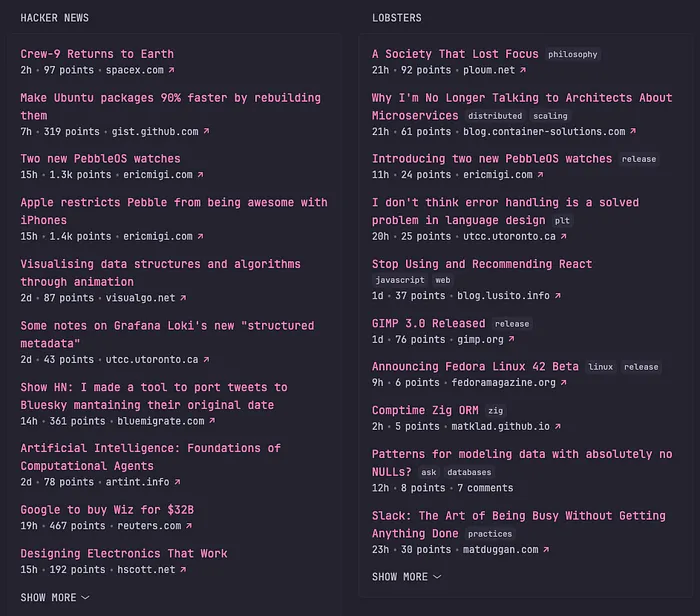
redditも組み込めます。
ここはちょっと自分の趣味を入れてこうと思います。
glance/docs/configuration.md at main · glanceapp/glance
A self-hosted dashboard that puts all your feeds in one place - glance/docs/configuration.md at main · glanceapp/glance
github.com
reddit.yaml
- type: group
  widgets:
    - type: reddit
      subreddit: neovim
      show-thumbnails: true
      limit: 20
      collapse-after: 10
    - type: reddit
      subreddit: linux
      show-thumbnails: true
      limit: 20
      collapse-after: 10
    - type: reddit
      subreddit: Python
      show-thumbnails: true
      limit: 20
      collapse-after: 10
    - type: reddit
      subreddit: lua
      show-thumbnails: true
      limit: 20
      collapse-after: 10
    - type: reddit
      subreddit: rust
      show-thumbnails: true
      limit: 20
      collapse-after: 10
    - type: reddit
      subreddit: googlecloud
      show-thumbnails: true
      limit: 20
      collapse-after: 10
    - type: reddit
      subreddit: bigquery
      show-thumbnails: true
      limit: 20
      collapse-after: 10
    - type: reddit
      subreddit: GeForceNOW
      show-thumbnails: true
      limit: 20
      collapse-after: 10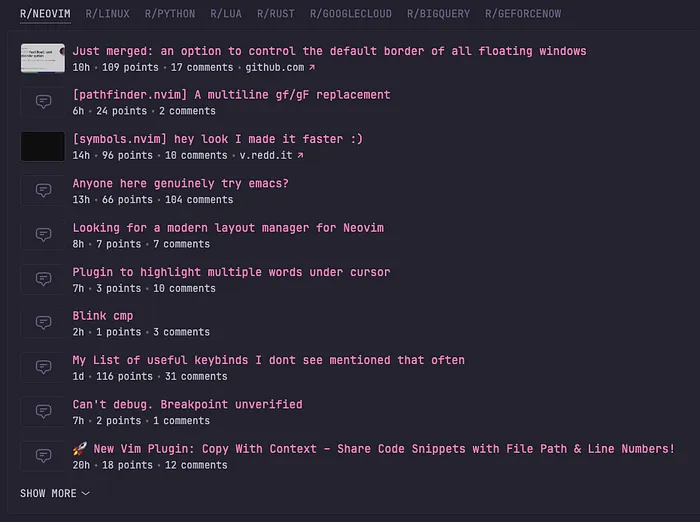
Server-stats
localのstats monitoringもできるみたいです。
glance/docs/configuration.md at main · glanceapp/glance
A self-hosted dashboard that puts all your feeds in one place - glance/docs/configuration.md at main · glanceapp/glance
github.com
server-stats.yaml
- type: server-stats
  servers:
    - type: local
      name: Darwin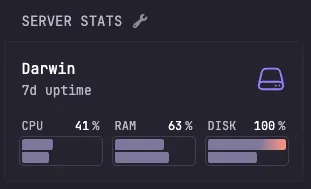
Calendar
カレンダーも表示できる
これはGoogle Calendarと繋がると良かったけど、GoogleのAPIちょっとめんどくさいもんなぁ・・・
glance/docs/configuration.md at main · glanceapp/glance
A self-hosted dashboard that puts all your feeds in one place - glance/docs/configuration.md at main · glanceapp/glance
github.com
calendar.yaml
自分は日曜はじまりのカレンダーが好きです🤣
- type: calendar
  first-day-of-week: sunday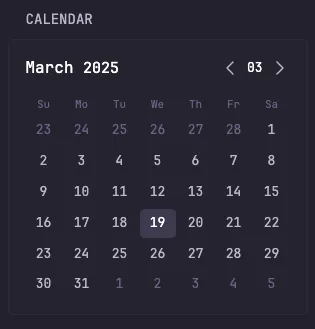
Weather
天気予報
glance/docs/configuration.md at main · glanceapp/glance
A self-hosted dashboard that puts all your feeds in one place - glance/docs/configuration.md at main · glanceapp/glance
github.com
weather.yaml
locationいじるだけです。
- type: weather
  location: Tokyo, Japan
  units: metric # alternatively "imperial"
  hour-format: 24h # alternatively "24h"
  # Optionally hide the location from being displayed in the widget
  # hide-location: true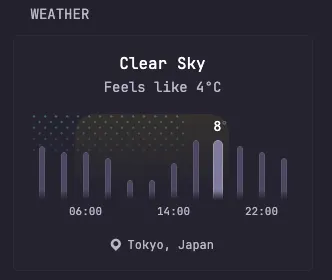
Releases
gitのreleaseを一覧化してくれます。
glance/docs/configuration.md at main · glanceapp/glance
A self-hosted dashboard that puts all your feeds in one place - glance/docs/configuration.md at main · glanceapp/glance
github.com
repositories
glance/docs/configuration.md at main · glanceapp/glance
A self-hosted dashboard that puts all your feeds in one place - glance/docs/configuration.md at main · glanceapp/glance
github.com
- type: releases
  show-source-icon: true
  repositories:
    - go-gitea/gitea
    - jellyfin/jellyfin
    - glanceapp/glance
    - codeberg:redict/redict
    - gitlab:fdroid/fdroidclient
    - dockerhub:gotify/server
こんな感じでいろいろなリポジトリに対応しているみたいです。
token
glance/docs/configuration.md at main · glanceapp/glance
A self-hosted dashboard that puts all your feeds in one place - glance/docs/configuration.md at main · glanceapp/glance
github.com
shellに以下のようにexportしておいて
export GITHUB_READONLY_TOKEN=github_pat_xxxxxxxxxxxxxxxxxxxxxxxxxxxxxtoken: ${GITHUB_READONLY_TOKEN}yamlで上記のように定義するとリポジトリ読み取り回数の制限を回避できるようになります。
releases.yaml
- type: releases
  cache: 1d
  show-source-icon: true
  limit: 10
  # Without authentication the Github API allows for up to 60 requests per hour. You can create a
  # read-only token from your Github account settings and use it here to increase the limit.
  # token: ...
  token: ${GITHUB_READONLY_TOKEN}
  repositories:
    - neovim/neovim
    - AstroNvim/AstroNvim
    - astral-sh/uv
    - starship/starship
    - glanceapp/glance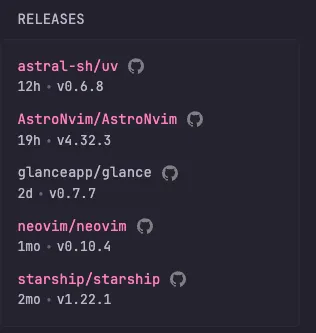
ざっとglanceについて紹介しました。
個人的にはこういうカスタマイズしてすべて1画面に収めたいって気持ちめちゃくちゃわかります。
少し前にArc Browserも話題になってましたが、1画面でできるだけアクセスするサイトを網羅して切り替えるといったブラウザも増えてきているので、またGoogleもiGoogle復活させ・・・しないか・・・
ちなみに自分はArc BrowserがメインWindowだったりします😂
- 常時開いておきたいものはArc Browser
- テンポラリはGoogle Chrome
こんな使い方をしています。
最近だとPerplexityとかChatGPTとかClaudeとかGeminiを使い分けてたりするのでこの手のwidgetもあると良いかもしれないなと思ったりしました。
あとカスタマイズが重視されてる感じだと思うので、neovimみたいにluaでバンバン拡張・・・みたいな・・・
何度も言いますが、やっぱりiGoogleみたいですね・・・
ちなみに社内に聞いてみましたが、みんなしらないって言います🥲
iGoogle知ってるあなたは私も含めてオジサンってことでいいですかね🤣
自分はUnix/Linuxのエンジニアなので、glanceと聞いてglancesを思い出しました。
ターミナル環境について他の記事も書いているので、よろしければこちらもご覧ください!
『ターミナルがダサいとモテない』シリーズ一覧
転載:ターミナルがダサいとモテない。glanceでpersonal dashboard
この記事は Medium(@yusuke_h) からの転載です。
この記事を書いた人