


ターミナルがダサいとモテない。bash command-line framework argc編


Photo by Artem Sapegin on Unsplash
command-line frameworkは何を使っていますか?
恵比寿でIT企業をやっているとモテると聞いて創業しましたが早いことありがたいことに10年目に突入した長谷川です。
まだモテる成果は出ていません、、、これからです!(もうめんどくさいのでカウントやめました😆)
command-line frameworkを使ったことはありますか?
自分は以下を使ったことがあります。
rerunはmacbookの中で使っています。昔はgrasysとしても使ってた。
Typerはshellだと厳しい複雑なことをする際に利用してます。こちらもかなりシンプルに書けるので好き😆
App::Radはperlで最近はちょっとアレなので割愛して
Typerもドキュメントがしっかりしているので
rerunを下のpostで軽く紹介して本題のargcを紹介します。
ターミナルがダサいとモテない。bash command-line framework rerun編
bashのmodule型command-line framework rerun
medium.com
argc
さて本題のargcです。(めっちゃここまで時間かかった・・・😅)
GitHub - sigoden/argc: A Bash CLI framework, also a Bash command runner.
A Bash CLI framework, also a Bash command runner. Contribute to sigoden/argc development by creating an account on…
github.com
Argc is a powerful Bash framework that simplifies building full-featured CLIs. It lets you define your CLI through comments, focusing on your core logic without dealing with argument parsing, usage text, error messages, and other boilerplate code.
- bash用
- 簡単なフル機能のCLIの構成をサポート
- コメントを使った各種定義
- rust製
こんな感じです。
実際にちょっと使ってみて面白いと感じたので
今回、紹介することにしました。
Install
GitHub - sigoden/argc: A Bash CLI framework, also a Bash command runner.
A Bash CLI framework, also a Bash command runner. Contribute to sigoden/argc development by creating an account on…
github.com
homebrewにもあるようですが、自分はcargoで入れてます。
cargo install argcGet Started
GitHub - sigoden/argc: A Bash CLI framework, also a Bash command runner.
A Bash CLI framework, also a Bash command runner. Contribute to sigoden/argc development by creating an account on…
github.com
ざっとREADMEに書いてありますが、実はここだけ見てもわかりにくいのでこちらを見ましょう。
Command runner
argc/docs/command-runner.md at main · sigoden/argc
A Bash CLI framework, also a Bash command runner. Contribute to sigoden/argc development by creating an account on…
github.com
Specification
argc/docs/specification.md at main · sigoden/argc
A Bash CLI framework, also a Bash command runner. Contribute to sigoden/argc development by creating an account on…
github.com
Variables
argc/docs/variables.md at main · sigoden/argc
A Bash CLI framework, also a Bash command runner. Contribute to sigoden/argc development by creating an account on…
github.com
Help
ひとしきり情報を入れたところで、まずはhelpを叩いてみましょう。
argcはhelpが生成したscriptのhelpになっていて、argc自体のhelpはargc-helpというoptionになっています😅
argc --argc-help
A bash cli framework, also a bash-based command runner - https://github.com/sigoden/argc

USAGE:
    argc --argc-eval <FILE> <ARGS~>            Use `eval "$(argc --argc-eval "$0" "$@")"`
    argc --argc-create <RECIPES~>              Create a boilerplate argcfile
    argc --argc-run <FILE> <ARGS~>             Run an argc-based script
    argc --argc-build <FILE> <OUTPATH?>        Generate bashscript without argc dependency
    argc --argc-mangen <FILE> <OUTDIR>         Generate man pages
    argc --argc-completions <SHELL> <CMDS>     Generate shell completion scripts
    argc --argc-compgen <SHELL> <FILE> <ARGS>  Generate completion candidates
    argc --argc-export <FILE>                  Export command line definitions as json
    argc --argc-parallel <FILE> <ARGS~>        Run functions in parallel
    argc --argc-script-path                    Print current argcfile path
    argc --argc-shell-path                     Print current shell path
    argc --argc-help                           Print help information
    argc --argc-version                        Print version information
parallelがめっちゃ気になるけど、今回はやらない😅
create
それではちょっと検証用のDirectoryを作成してcreateしてみましょう。
mkdir -p ${HOME}/work/argc_test
cd ${HOME}/work/argc_test

argc --argc-create json download view
argc-createでjsonとdownloadとviewのサブコマンドを生成しています。
これでArgcfile.shが生成されるので開くと以下のようになっています。
先程のrerunのポストでで作ったunsplash APIでweztermのbackgroundを変えるScriptを例題として作っていきましょう。
cat Argcfile.sh
#!/usr/bin/env bash

set -e

# @cmd
json() {
    echo TODO json
}

# @cmd
download() {
    echo TODO download
}

# @cmd
view() {
    echo TODO view
}

# See more details at https://github.com/sigoden/argc
eval "$(argc --argc-eval "$0" "$@")"
これを使って試していきましょう。
Typerに似ていてSub commandの宣言に# at cmdとデコレーター(社員から聞いた😅)というのかな?が使われていてとってもシンプルに書けて素敵
普通にbashで書くとなるとswitch caseを書かないといけないので、それに比べるとかなりシンプルですね。最高!
Specification
argc/docs/specification.md at main · sigoden/argc
A Bash CLI framework, also a Bash command runner. Contribute to sigoden/argc development by creating an account on…
github.com
ここではSpecificationに含まれるものの説明をしていきます。
Specification: describe
argc/docs/specification.md at main · sigoden/argc
A Bash CLI framework, also a Bash command runner. Contribute to sigoden/argc development by creating an account on…
github.com
argc/docs/specification.md at main · sigoden/argc
A Bash CLI framework, also a Bash command runner. Contribute to sigoden/argc development by creating an account on…
github.com
作成するShell Scriptの説明を書けます。
以下のように複数行書けるみたいです。
# @describe wezterm background changer
#
# Change the background of wezterm using the unsplash APIargc --help
wezterm background changer
Change the background of wezterm using the unsplash API
USAGE: Argcfile <COMMAND>
COMMANDS:
json
download
viewSpecification: meta
argc/docs/specification.md at main · sigoden/argc
A Bash CLI framework, also a Bash command runner. Contribute to sigoden/argc development by creating an account on…
github.com
meta version
versionを定義
shebangのすぐ下辺りに書きましょう。
# @meta version 0.0.1argc --help
Argcfile 0.0.1
wezterm background changer
Change the background of wezterm using the unsplash API
USAGE: Argcfile <COMMAND>
COMMANDS:
json
download
viewmeta author
authorを定義
# @meta author yusukeh <xxxxx@example.com>argc --help
Argcfile 0.0.1
yusukeh <xxxxx@example.com>
wezterm background changer
Change the background of wezterm using the unsplash API
USAGE: Argcfile <COMMAND>
COMMANDS:
json
download
viewenv
環境変数を定義
argc/docs/specification.md at main · sigoden/argc
A Bash CLI framework, also a Bash command runner. Contribute to sigoden/argc development by creating an account on…
github.com
# @meta dotenv .env
# @env ACCESS_KEY!
環境変数名の末尾に!を入れると必須にできるみたい
unsplash APIのAccess Keyもここで作ってしまいましょう。
echo ACCESS_KEY=<unsplash API Access key> > .envargc --help
Argcfile 0.0.1
yusukeh <xxxxx@example.com>
wezterm background changer
Change the background of wezterm using the unsplash API
USAGE: Argcfile <COMMAND>
COMMANDS:
json
download
view
ENVIRONMENTS:
ACCESS_KEY*ENVIRONMENTS:にACCESS_KEY*が追加されました。
# @env DOWNLOAD_FILE=~/.config/wezterm/unsplash.jpg
# @env UNSPLASH_URL=https://api.unsplash.com/photos/randomargc
Argcfile 0.0.1
yusukeh <xxxxx@example.com>
wezterm background changer
Change the background of wezterm using the unsplash API
USAGE: Argcfile <COMMAND>
COMMANDS:
json
download
view
ENVIRONMENTS:
ACCESS_KEY*
DOWNLOAD_FILE [default: ~/.config/wezterm/unsplash.jpg]
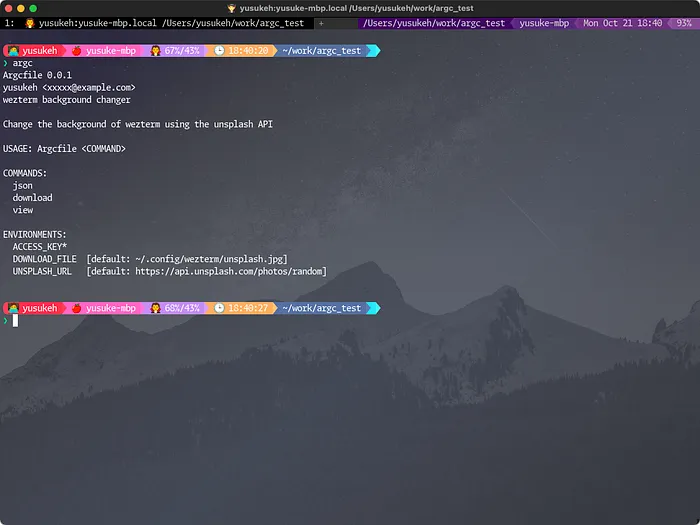
UNSPLASH_URL [default: https://api.unsplash.com/photos/random]DOWNLOAD_FILEとUNSPLASH_URLが追加されそれぞれにdefault値が入りました。
option
argc/docs/specification.md at 32e5c2861a357c293908209cc05517a0e91dd945 · sigoden/argc
A Bash CLI framework, also a Bash command runner. Contribute to sigoden/argc development by creating an account on…
github.com
optionを定義
すべてのcmdの後ろに入れていきましょう。
# @option --query=galaxy#!/usr/bin/env bash
# @describe wezterm background changer
#
# Change the background of wezterm using the unsplash API
# @meta version 0.0.1
# @meta author yusukeh <xxxxx@example.com>
# @meta dotenv .env
# @env ACCESS_KEY!
# @env DOWNLOAD_FILE=~/.config/wezterm/unsplash.jpg
# @env UNSPLASH_URL=https://api.unsplash.com/photos/random
set -e
# @cmd
# @option --query=galaxy
json() {
echo TODO json
}
# @cmd
# @option --query=galaxy
download() {
echo TODO download
}
# @cmd
# @option --query=galaxy
view() {
echo TODO view
}
# See more details at https://github.com/sigoden/argc
eval "$(argc --argc-eval "$0" "$@")"argc json --help
USAGE: Argcfile json [OPTIONS]
OPTIONS:
--query <QUERY> [default: galaxy]
-h, --help
ENVIRONMENTS:
ACCESS_KEY*
DOWNLOAD_FILE [default: '${HOME}/.config/wezterm/unsplash.jpg']
UNSPLASH_URL [default: https://api.unsplash.com/photos/random]command jsonにhelpを渡すとqueryのoptionが見えるようになりました。
queryの値は${argc_query}でアクセスできます。
#!/usr/bin/env bash
# @describe wezterm background changer
#
# Change the background of wezterm using the unsplash API
# @meta version 0.0.1
# @meta author yusukeh <xxxxx@example.com>
# @meta dotenv .env
# @env ACCESS_KEY!
# @env DOWNLOAD_FILE=~/.config/wezterm/unsplash.jpg
# @env UNSPLASH_URL=https://api.unsplash.com/photos/random

set -e

_query() {
    echo "query: $1"
}

# @cmd
# @option --query=galaxy
json() {
    _query ${argc_query}
}

# @cmd
# @option --query=galaxy
download() {
    echo TODO download
}

# @cmd
# @option --query=galaxy
view() {
    echo TODO view
}

# See more details at https://github.com/sigoden/argc
eval "$(argc --argc-eval "$0" "$@")"argc json
query: galaxy
argc json --query=forest
query: forestめっちゃいいね
Shellでgetoptとかgetoptsとか大変だもん・・・😅
ここで紹介したものとは少し別で、ちょっと試してみたのですが、cmdの前に入れるとsub commandの前でoptionを入れられるようになりglobal optionとしても活用できます。
meta require-tools
Require certain tools to be available on the system.
と書かれているので必須のコマンドなどを列挙できます。
今回はwezterm, jq, curlを利用しています。
# @require-tools wezterm,jq,curlじゃあちょっとがんがん中身を書いて行く😆
#!/usr/bin/env bash
# @describe wezterm background changer
#
# Change the background of wezterm using the unsplash API
# @meta version 0.0.1
# @meta author yusukeh <xxxxx@example.com>
# @meta dotenv .env
# @meta require-tools wezterm,curl,jq
# @env ACCESS_KEY!
# @env DOWNLOAD_FILE=~/.config/wezterm/unsplash.jpg
# @env UNSPLASH_URL=https://api.unsplash.com/photos/random

set -e

_query() {
    echo "query: $1"
}

# @cmd
# @option --query=galaxy
json() {
  curl -s "${UNSPLASH_URL}?client_id=${ACCESS_KEY}&query=${argc_query}"
}

# @cmd
# @option --query=galaxy
download() {
  image_url=$(curl -s "${UNSPLASH_URL}?client_id=${ACCESS_KEY}&query=${argc_query}" | jq -r ".urls.full")
  curl -s -o ${DOWNLOAD_FILE} "${image_url}"
  wezterm imgcat --height=50% ${DOWNLOAD_FILE}
}

# @cmd
# @option --query=galaxy
view() {
  image_url=$(curl -s "${UNSPLASH_URL}?client_id=${ACCESS_KEY}&query=${argc_query}" | jq -r ".urls.full")
  curl -s ${image_url} | wezterm imgcat --height=50%
}

# See more details at https://github.com/sigoden/argc
eval "$(argc --argc-eval "$0" "$@")"
argc
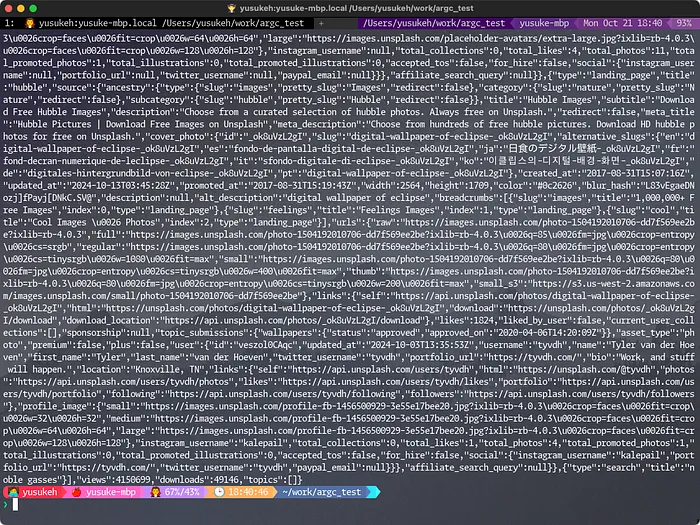
argc json
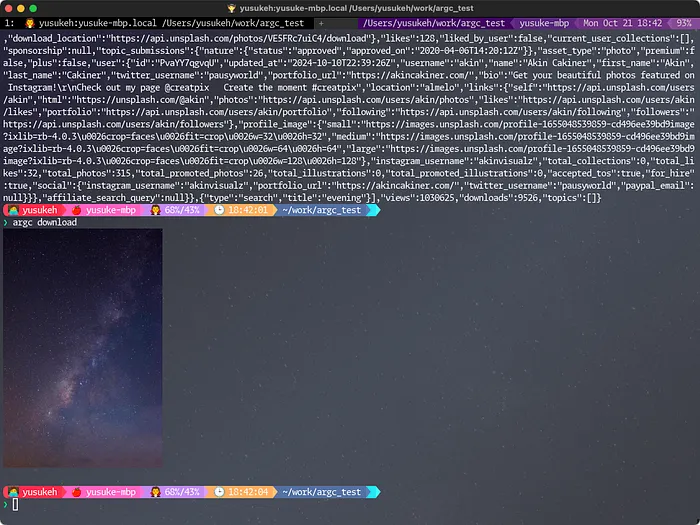
argc download
argc view
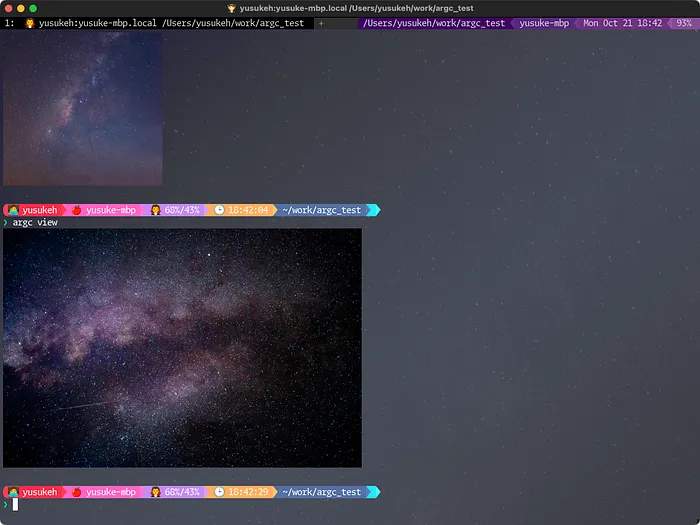
一応一通り動きました。
argc build
コンパイルされたscriptを生成してくれます。
argc --argc-build Argcfile.sh unsplash_wezterm#!/usr/bin/env bash
# @describe wezterm background changer
#
# Change the background of wezterm using the unsplash API
# @meta version 0.0.1
# @meta author yusukeh <xxxxx@example.com>
# @meta dotenv .env
# @meta require-tools wezterm,curl,jq
# @env ACCESS_KEY!
# @env DOWNLOAD_FILE=~/.config/wezterm/unsplash.jpg
# @env UNSPLASH_URL=https://api.unsplash.com/photos/random
set -e
_query() {
echo "query: $1"
}
# @cmd
# @option --query=galaxy
json() {
curl -s "${UNSPLASH_URL}?client_id=${ACCESS_KEY}&query=${argc_query}"
}
# @cmd
# @option --query=galaxy
download() {
image_url=$(curl -s "${UNSPLASH_URL}?client_id=${ACCESS_KEY}&query=${argc_query}" | jq -r ".urls.full")
curl -s -o ${DOWNLOAD_FILE} "${image_url}"
wezterm imgcat --height=50% ${DOWNLOAD_FILE}
}
# @cmd
# @option --query=galaxy
view() {
image_url=$(curl -s "${UNSPLASH_URL}?client_id=${ACCESS_KEY}&query=${argc_query}" | jq -r ".urls.full")
curl -s ${image_url} | wezterm imgcat --height=50%
}
# See more details at https://github.com/sigoden/argc
# ARGC-BUILD {
# This block was generated by argc (https://github.com/sigoden/argc).
# Modifying it manually is not recommended
_argc_run() {
if [[ "${1:-}" == "___internal___" ]]; then
_argc_die "error: unsupported ___internal___ command"
fi
if [[ "${OS:-}" == "Windows_NT" ]] && [[ -n "${MSYSTEM:-}" ]]; then
set -o igncr
fi
argc__args=("$(basename "$0" .sh)" "$@")
argc__positionals=()
_argc_index=1
_argc_len="${#argc__args[@]}"
[ -f .env ] && set -o allexport && . .env && set +o allexport
_argc_tools=()
_argc_parse
_argc_require_tools "${_argc_tools[@]}"
if [ -n "${argc__fn:-}" ]; then
$argc__fn "${argc__positionals[@]}"
fi
}
_argc_usage() {
cat <<-'EOF'
Argcfile 0.0.1
yusukeh <xxxxx@example.com>
wezterm background changer
Change the background of wezterm using the unsplash API
USAGE: Argcfile <COMMAND>
COMMANDS:
json
download
view
ENVIRONMENTS:
ACCESS_KEY*
DOWNLOAD_FILE [default: ~/.config/wezterm/unsplash.jpg]
UNSPLASH_URL [default: https://api.unsplash.com/photos/random]
EOF
exit
}
_argc_version() {
echo Argcfile 0.0.1
exit
}
_argc_parse() {
local _argc_key _argc_action
local _argc_subcmds="json, download, view"
while [[ $_argc_index -lt $_argc_len ]]; do
_argc_item="${argc__args[_argc_index]}"
_argc_key="${_argc_item%%=*}"
case "$_argc_key" in
--help | -help | -h)
_argc_usage
;;
--version | -version | -V)
_argc_version
;;
--)
_argc_dash="${#argc__positionals[@]}"
argc__positionals+=("${argc__args[@]:$((_argc_index + 1))}")
_argc_index=$_argc_len
break
;;
json)
_argc_index=$((_argc_index + 1))
_argc_action=_argc_parse_json
break
;;
download)
_argc_index=$((_argc_index + 1))
_argc_action=_argc_parse_download
break
;;
view)
_argc_index=$((_argc_index + 1))
_argc_action=_argc_parse_view
break
;;
help)
local help_arg="${argc__args[$((_argc_index + 1))]:-}"
case "$help_arg" in
json)
_argc_usage_json
;;
download)
_argc_usage_download
;;
view)
_argc_usage_view
;;
"")
_argc_usage
;;
*)
_argc_die "error: invalid value \`$help_arg\` for \`<command>\`"$'\n'" [possible values: $_argc_subcmds]"
;;
esac
;;
*)
_argc_die "error: \`Argcfile\` requires a subcommand but one was not provided"$'\n'" [subcommands: $_argc_subcmds]"
;;
esac
done
_argc_tools=(wezterm curl jq)
if [[ -n "${_argc_action:-}" ]]; then
$_argc_action
else
_argc_usage
fi
}
_argc_usage_json() {
cat <<-'EOF'
USAGE: Argcfile json [OPTIONS]
OPTIONS:
--query <QUERY> [default: galaxy]
-h, --help
ENVIRONMENTS:
ACCESS_KEY*
DOWNLOAD_FILE [default: ~/.config/wezterm/unsplash.jpg]
UNSPLASH_URL [default: https://api.unsplash.com/photos/random]
EOF
exit
}
_argc_parse_json() {
local _argc_key _argc_action
local _argc_subcmds=""
while [[ $_argc_index -lt $_argc_len ]]; do
_argc_item="${argc__args[_argc_index]}"
_argc_key="${_argc_item%%=*}"
case "$_argc_key" in
--help | -help | -h)
_argc_usage_json
;;
--)
_argc_dash="${#argc__positionals[@]}"
argc__positionals+=("${argc__args[@]:$((_argc_index + 1))}")
_argc_index=$_argc_len
break
;;
--query)
_argc_take_args "--query <QUERY>" 1 1 "-" ""
_argc_index=$((_argc_index + _argc_take_args_len + 1))
if [[ -z "${argc_query:-}" ]]; then
argc_query="${_argc_take_args_values[0]:-}"
else
_argc_die "error: the argument \`--query\` cannot be used multiple times"
fi
;;
*)
if _argc_maybe_flag_option "-" "$_argc_item"; then
_argc_die "error: unexpected argument \`$_argc_key\` found"
fi
argc__positionals+=("$_argc_item")
_argc_index=$((_argc_index + 1))
;;
esac
done
_argc_tools=(wezterm curl jq)
if [[ -n "${_argc_action:-}" ]]; then
$_argc_action
else
argc__fn=json
if [[ "${argc__positionals[0]:-}" == "help" ]] && [[ "${#argc__positionals[@]}" -eq 1 ]]; then
_argc_usage_json
fi
if [[ -z "${argc_query:-}" ]]; then
argc_query=galaxy
fi
_argc_require_params "error: the following required environments were not provided:" \
ACCESS_KEY:ACCESS_KEY
if [[ -z "${DOWNLOAD_FILE:-}" ]]; then
export DOWNLOAD_FILE=~/.config/wezterm/unsplash.jpg
fi
if [[ -z "${UNSPLASH_URL:-}" ]]; then
export UNSPLASH_URL=https://api.unsplash.com/photos/random
fi
fi
}
_argc_usage_download() {
cat <<-'EOF'
USAGE: Argcfile download [OPTIONS]
OPTIONS:
--query <QUERY> [default: galaxy]
-h, --help
ENVIRONMENTS:
ACCESS_KEY*
DOWNLOAD_FILE [default: ~/.config/wezterm/unsplash.jpg]
UNSPLASH_URL [default: https://api.unsplash.com/photos/random]
EOF
exit
}
_argc_parse_download() {
local _argc_key _argc_action
local _argc_subcmds=""
while [[ $_argc_index -lt $_argc_len ]]; do
_argc_item="${argc__args[_argc_index]}"
_argc_key="${_argc_item%%=*}"
case "$_argc_key" in
--help | -help | -h)
_argc_usage_download
;;
--)
_argc_dash="${#argc__positionals[@]}"
argc__positionals+=("${argc__args[@]:$((_argc_index + 1))}")
_argc_index=$_argc_len
break
;;
--query)
_argc_take_args "--query <QUERY>" 1 1 "-" ""
_argc_index=$((_argc_index + _argc_take_args_len + 1))
if [[ -z "${argc_query:-}" ]]; then
argc_query="${_argc_take_args_values[0]:-}"
else
_argc_die "error: the argument \`--query\` cannot be used multiple times"
fi
;;
*)
if _argc_maybe_flag_option "-" "$_argc_item"; then
_argc_die "error: unexpected argument \`$_argc_key\` found"
fi
argc__positionals+=("$_argc_item")
_argc_index=$((_argc_index + 1))
;;
esac
done
_argc_tools=(wezterm curl jq)
if [[ -n "${_argc_action:-}" ]]; then
$_argc_action
else
argc__fn=download
if [[ "${argc__positionals[0]:-}" == "help" ]] && [[ "${#argc__positionals[@]}" -eq 1 ]]; then
_argc_usage_download
fi
if [[ -z "${argc_query:-}" ]]; then
argc_query=galaxy
fi
_argc_require_params "error: the following required environments were not provided:" \
ACCESS_KEY:ACCESS_KEY
if [[ -z "${DOWNLOAD_FILE:-}" ]]; then
export DOWNLOAD_FILE=~/.config/wezterm/unsplash.jpg
fi
if [[ -z "${UNSPLASH_URL:-}" ]]; then
export UNSPLASH_URL=https://api.unsplash.com/photos/random
fi
fi
}
_argc_usage_view() {
cat <<-'EOF'
USAGE: Argcfile view [OPTIONS]
OPTIONS:
--query <QUERY> [default: galaxy]
-h, --help
ENVIRONMENTS:
ACCESS_KEY*
DOWNLOAD_FILE [default: ~/.config/wezterm/unsplash.jpg]
UNSPLASH_URL [default: https://api.unsplash.com/photos/random]
EOF
exit
}
_argc_parse_view() {
local _argc_key _argc_action
local _argc_subcmds=""
while [[ $_argc_index -lt $_argc_len ]]; do
_argc_item="${argc__args[_argc_index]}"
_argc_key="${_argc_item%%=*}"
case "$_argc_key" in
--help | -help | -h)
_argc_usage_view
;;
--)
_argc_dash="${#argc__positionals[@]}"
argc__positionals+=("${argc__args[@]:$((_argc_index + 1))}")
_argc_index=$_argc_len
break
;;
--query)
_argc_take_args "--query <QUERY>" 1 1 "-" ""
_argc_index=$((_argc_index + _argc_take_args_len + 1))
if [[ -z "${argc_query:-}" ]]; then
argc_query="${_argc_take_args_values[0]:-}"
else
_argc_die "error: the argument \`--query\` cannot be used multiple times"
fi
;;
*)
if _argc_maybe_flag_option "-" "$_argc_item"; then
_argc_die "error: unexpected argument \`$_argc_key\` found"
fi
argc__positionals+=("$_argc_item")
_argc_index=$((_argc_index + 1))
;;
esac
done
_argc_tools=(wezterm curl jq)
if [[ -n "${_argc_action:-}" ]]; then
$_argc_action
else
argc__fn=view
if [[ "${argc__positionals[0]:-}" == "help" ]] && [[ "${#argc__positionals[@]}" -eq 1 ]]; then
_argc_usage_view
fi
if [[ -z "${argc_query:-}" ]]; then
argc_query=galaxy
fi
_argc_require_params "error: the following required environments were not provided:" \
ACCESS_KEY:ACCESS_KEY
if [[ -z "${DOWNLOAD_FILE:-}" ]]; then
export DOWNLOAD_FILE=~/.config/wezterm/unsplash.jpg
fi
if [[ -z "${UNSPLASH_URL:-}" ]]; then
export UNSPLASH_URL=https://api.unsplash.com/photos/random
fi
fi
}
_argc_take_args() {
_argc_take_args_values=()
_argc_take_args_len=0
local param="$1" min="$2" max="$3" signs="$4" delimiter="$5"
if [[ "$min" -eq 0 ]] && [[ "$max" -eq 0 ]]; then
return
fi
local _argc_take_index=$((_argc_index + 1)) _argc_take_value
if [[ "$_argc_item" == *=* ]]; then
_argc_take_args_values=("${_argc_item##*=}")
else
while [[ $_argc_take_index -lt $_argc_len ]]; do
_argc_take_value="${argc__args[_argc_take_index]}"
if _argc_maybe_flag_option "$signs" "$_argc_take_value"; then
if [[ "${#_argc_take_value}" -gt 1 ]]; then
break
fi
fi
_argc_take_args_values+=("$_argc_take_value")
_argc_take_args_len=$((_argc_take_args_len + 1))
if [[ "$_argc_take_args_len" -ge "$max" ]]; then
break
fi
_argc_take_index=$((_argc_take_index + 1))
done
fi
if [[ "${#_argc_take_args_values[@]}" -lt "$min" ]]; then
_argc_die "error: incorrect number of values for \`$param\`"
fi
if [[ -n "$delimiter" ]] && [[ "${#_argc_take_args_values[@]}" -gt 0 ]]; then
local item values arr=()
for item in "${_argc_take_args_values[@]}"; do
IFS="$delimiter" read -r -a values <<<"$item"
arr+=("${values[@]}")
done
_argc_take_args_values=("${arr[@]}")
fi
}
_argc_require_params() {
local message="$1" missed_envs="" item name render_name
for item in "${@:2}"; do
name="${item%%:*}"
render_name="${item##*:}"
if [[ -z "${!name:-}" ]]; then
missed_envs="$missed_envs"$'\n'" $render_name"
fi
done
if [[ -n "${missed_envs}" ]]; then
_argc_die "$message$missed_envs"
fi
}
_argc_maybe_flag_option() {
local signs="$1" arg="$2"
if [[ -z "$signs" ]]; then
return 1
fi
local cond=false
if [[ "$signs" == *"+"* ]]; then
if [[ "$arg" =~ ^\+[^+].* ]]; then
cond=true
fi
elif [[ "$arg" == -* ]]; then
if (( ${#arg} < 3 )) || [[ ! "$arg" =~ ^---.* ]]; then
cond=true
fi
fi
if [[ "$cond" == "false" ]]; then
return 1
fi
local value="${arg%%=*}"
if [[ "$value" =~ [[:space:]] ]]; then
return 1
fi
return 0
}
_argc_require_tools() {
local tool missing_tools=()
for tool in "$@"; do
if ! command -v "$tool" >/dev/null 2>&1; then
missing_tools+=("$tool")
fi
done
if [[ "${#missing_tools[@]}" -gt 0 ]]; then
echo "error: missing tools: ${missing_tools[*]}" >&2
exit 1
fi
}
_argc_die() {
if [[ $# -eq 0 ]]; then
cat
else
echo "$*" >&2
fi
exit 1
}
_argc_run "$@"
# ARGC-BUILD }これでargcがなくても動くscriptになりました。
良く生成されたbashのコードをみるとすごい!素敵!😀
これ自分で書くの大変だよ・・・😅
argc-mangen
argc --argc-mangen unsplash_wezterm share/man/man1manとかも作ってくれます。
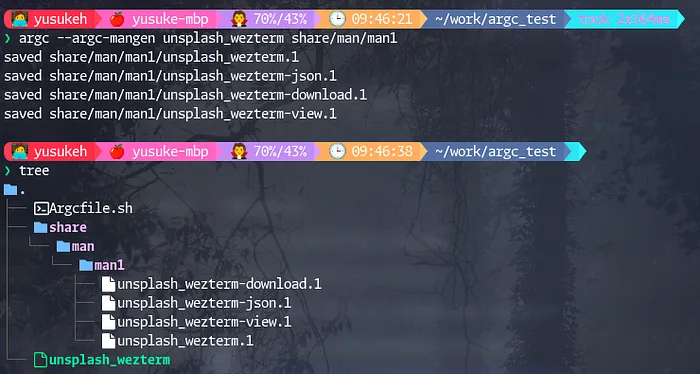
ちょっとみなさんの環境にMANPATH入ってるかわからないけど
入ってたら適当に追記してsetし直して下さい。
MANPATH=${HOME}/work/argc_test/share/man:${MANPATH}man unsplash_wezterm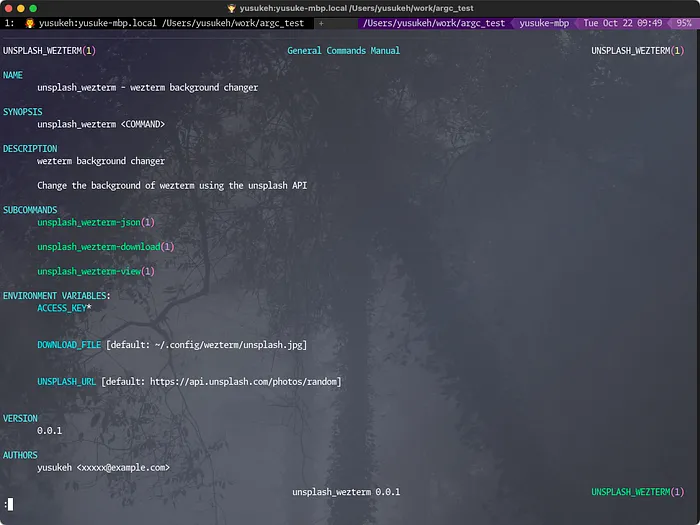
ほんとにmanpageが🤣
completions
completionsも生成してくれます。
PATH=${PWD}:${PATH}
source <(argc --argc-completions $(basename ${SHELL}) unsplash_wezterm)argcの紹介は以上です。
ざっと説明しました。
ちょっとしたものであればcommand runnerのjustやmakedownなどでも良いですが、少し複雑なものになるとscript化したいこともあると思います。
チーム内でのscript配布などで活躍するんじゃないかと感じました。
配布する際の依存が少なくて、switch caseもgetopt/getoptsいらずな点も素敵😆
ターミナル環境について他の記事も書いているので、よろしければこちらもご覧ください!
『ターミナルがダサいとモテない』シリーズ一覧
転載:ターミナルがダサいとモテない。bash command-line framework argc編
この記事は Medium(@yusuke_h) からの転載です。
この記事を書いた人