


Apache AirFlow で別コンテナを立ち上げて実行
 k-watanabe
- 公開日:2026年2月25日
- カテゴリー:Tech
- Markdown: For AI

業務でApache AirFlowを初めて触りました。既にコンテナ化していたスクリプトをパイプラインに組み込みたく色々調べたところ、AirFlowのオペレータにDockerOperatorがありました。個人的に詰まったポイントなど共有できればと思います
AirFlowもDockerで実行する
- まずAirFlowをDocker Composeで立ち上げます。公式からdocker-compose.yamlをダウンロードします
curl -LfO 'https://airflow.apache.org/docs/apache-airflow/3.1.6/docker-compose.yaml'- ディレクトリの作成
mkdir -p ./dags ./logs ./plugins ./config
echo -e "AIRFLOW_UID=$(id -u)" > .env- airflow.cfg を初期化する
docker compose run airflow-cli airflow config list- データベースを初期化する
docker compose up airflow-init- サンプルDagを非表示にする
docker-compose.yamlから AIRFLOW__CORE__LOAD_EXAMPLESを探し出して修正します
# 修正前
AIRFLOW__CORE__LOAD_EXAMPLES: 'true'

# 修正後
AIRFLOW__CORE__LOAD_EXAMPLES: 'false'- Volumeのマウント
別コンテナを起動するためにホスト側のDocker Engineを操作できるようにする必要があります。
そのためソケットファイルをマウントします
docker-compose.yamlのx-airflow-commonのvolumesに追加
volumes:
    - ${AIRFLOW_PROJ_DIR:-.}/dags:/opt/airflow/dags
    - ${AIRFLOW_PROJ_DIR:-.}/logs:/opt/airflow/logs
    - ${AIRFLOW_PROJ_DIR:-.}/config:/opt/airflow/config
    - ${AIRFLOW_PROJ_DIR:-.}/plugins:/opt/airflow/plugins
- /var/run/docker.sock:/var/run/docker.sock <-- 追加- 実行
docker compose up- ブラウザからアクセス
http://localhost:8080Pythonをビルドする
CSVファイルを読み込んで操作した結果をファイルに書き出すPythonコードをビルドします
scoreによってランク付けします
-
0~30: C
-
31~50: B
-
51~80: A
-
81~100:S
datas/sample.csv
Geminiで生成しました
id,team,score
1,teamA,82
2,teamB,65
3,teamC,91
4,teamD,74
5,teamE,48
6,teamF,88
7,teamG,56
8,teamH,95
9,teamI,72
10,teamJ,83
11,teamK,41
12,teamL,67
13,teamM,59
14,teamN,92
15,teamO,30
16,teamP,78
17,teamQ,85
18,teamR,52
19,teamS,61
20,teamT,70
※実在しないサンプルデータです
main.py
import pandas as pd

df = pd.read_csv('datas/sample.csv')

def assign_rank(score):
    if score <= 30:
        return 'C'
    elif score <= 50:
        return 'B'
    elif score <= 80:
        return 'A'
    else:
        return 'S'

df['rank'] = df['score'].apply(assign_rank)

df.to_csv('results/ranked.csv', index=False)

print(df)
Dockerfile
FROM python:3.11-slim

WORKDIR /app

COPY requirements.txt .
RUN pip install --no-cache-dir -r requirements.txt

COPY . .

CMD ["python", "main.py"]
ビルド
docker build -t python-sample:latest .Dagの作成
/dags/python-sample.pyでDagファイルを作成します
import os
from docker.types import Mount
from airflow.sdk import dag
import datetime
from airflow.providers.docker.operators.docker import DockerOperator

@dag(
    schedule=None,
    start_date=datetime.datetime(2025, 1, 1),
    catchup=False,
    tags=["test"],
)
def python_sample():

    base_path = os.getenv("BASE_PATH")

    DockerOperator(
        task_id="python-sample",
        container_name="python_sample",
        entrypoint=['python', 'main.py'],
        image="python-sample:latest",
        network_mode="my_network",
        auto_remove="force",
        docker_url="unix://var/run/docker.sock",
        mount_tmp_dir=False,
        mounts=[
            Mount(target="/app/datas", source=f"{base_path}datas/", type="bind"),
            Mount(target="/app/results", source=f"{base_path}results", type="bind"),
        ],
    )

python_sample()
DockerOperatorについて説明していきます
-
task_id: タスクのID
-
container_name: 起動するコンテナ名
-
entrypoint: エントリーポイント
-
image: 先ほどビルドしたイメージ名
-
network_mode: ネットワークを指定。必要なければ省略可です。
-
auto_remove: コンテナを削除するかどうか
-
docker_url: マウントしたソケットファイル
-
mount_tmp_dir:
-
mounts: 起動したコンテナにマウントしたい場合に指定。
- 環境変数BASE_PATHには /Users/username/path/to/airflowのように絶対パスを入れます
AirFlowを起動する
docker compose up -d --buildブラウザでアクセスしてサイドバーのDagsでDagを開きます
http://localhost:8089/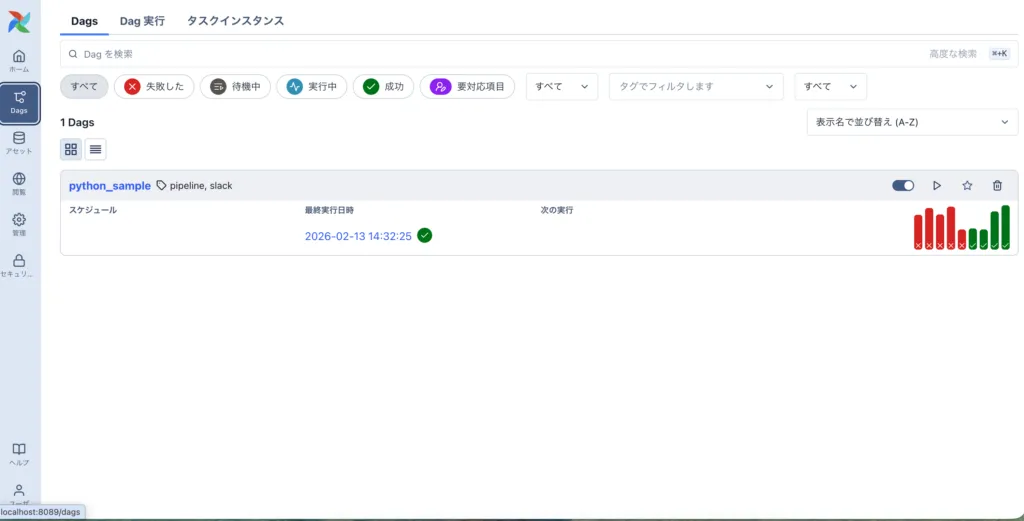
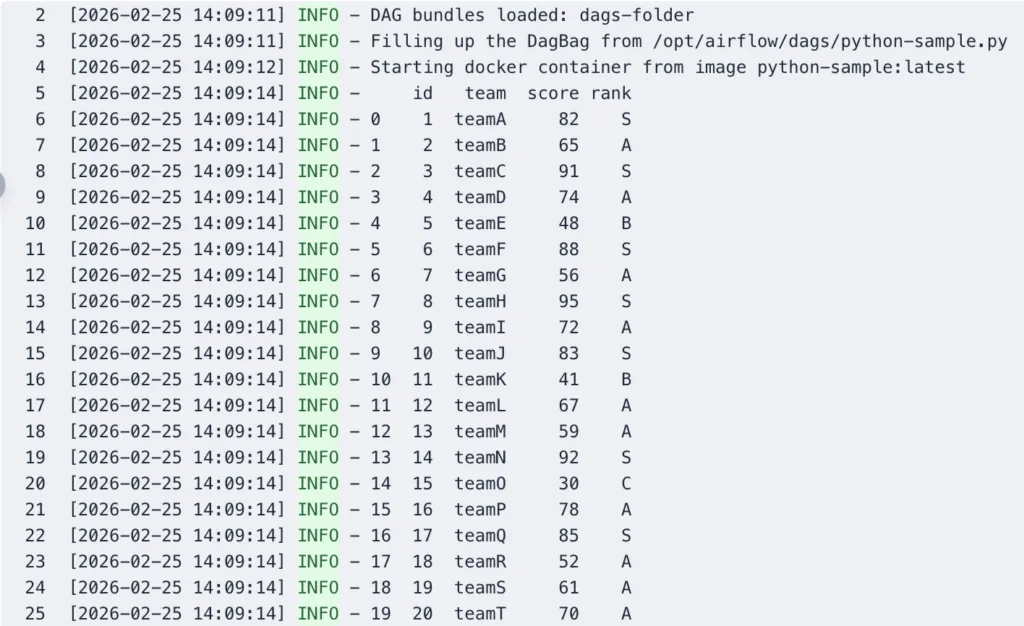
トリガーボタンでDagを実行します。するとDockerOperatorのcontainer_nameのコンテナが起動しています。
auto_remove: force にしているので実行が終わるとコンテナは削除されます。

ログにはpythonコードのログが出力されています
まとめ
既に実装していたコードを修正せずにパイプラインを構築したかったため、DockerOperatorはとても重宝しました。
起動したコンテナにマウントする場合絶対パスで指定するところで躓きました。。。ログがAirFlowにそのまま出力されるのでパイプラインコードと処理コードを切り分けて実装できるのが良いなと思いました。他にも便利なOperatorがあるので引き続き勉強していきたいです。
この記事を書いた人