


Google Stackdriver Monitoring Compute Engine セットアップ編 2016年10月

こんにちはgrasys長谷川です。
今日はStackdriverの記事を書こうと思います。
一応Updateも激しいのでタイトルに年月入れときました。
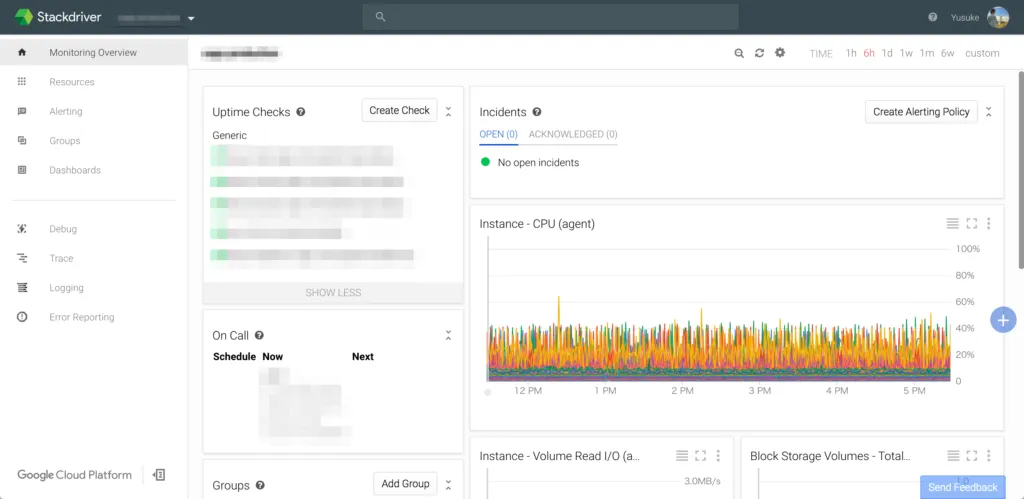
統合監視ツールの画面っぽくなってきました。
ちょっぴりインシデント管理も兼ねているので、障害履歴とその対応履歴なども追うことができます。
Documentはここ -> Stackdriver Monitoring
Instance 作成
| Parameter | Value |
|---|---|
| INSTANCE_NAME | インスタンスの名前になります。適当な名前を |
| IMAGE | gcloud compute images listでCentOS系を選んで下さい。 |
| –scopes | デフォルトの設定を入れてます。 |
gcloud compute instances create [INSTANCE_NAME] \
  --zone "us-west1-b" \
  --machine-type "g1-small" \
  --network "default" \
  --maintenance-policy "MIGRATE" \
  --scopes default="https://www.googleapis.com/auth/logging.write","https://www.googleapis.com/auth/monitoring.write","https://www.googleapis.com/auth/servicecontrol","https://www.googleapis.com/auth/service.management.readonly","https://www.googleapis.com/auth/devstorage.read_only" \
  --image [IMAGE] \
  --boot-disk-size "10" \
  --boot-disk-type "pd-standard" \
  --boot-disk-device-name [INSTANCE_NAME]
credentialは説明がめんどいので、今回はscopeで対応します。
Cloud Monitoring APIを有効にしてInstanceを構成して下さい。
Stackdriver Monitoring
stackdriver-agentのinstall
curl -O "https://repo.stackdriver.com/stack-install.sh"
sudo bash stack-install.sh --write-gcm
Init
- /etc/init.d/stackdriver-agent
- /etc/init.d/stackdriver-extractor
Directory Tree
tree -L 2 /opt/stackdriver/
/opt/stackdriver/
├── collectd
│   ├── bin
│   ├── etc
│   ├── include
│   ├── lib64
│   ├── man
│   ├── sbin
│   └── share
├── extractor
│   ├── bin
│   └── etc
└── stack-config

11 directories, 1 file/opt/stackdriver配下に配置されます。
collectdがベースになってます。
本家のcollectdもplugin形式になっていて、様々なミドルウェアを監視対象にすることができるのですが
stackdriverも拡張が可能になっています。
Stackdriver Monitoring Third-party Applications
2016/10/03現在
以下に対応しているみたいです。
- Apache web server
- Cassandra
- CouchDB
- Elasticsearch
- HBase
- JVM Monitoring
- Kafka
- Memcached
- MongoDB
- MySQL
- Nginx
- PostgreSQL
- RabbitMQ
- Redis
- Riak
- Tomcat
- Varnish
- ZooKeeper
configの追加で対応可能です。
/opt/stackdriver/collectd/etc/collectd.dここに所定の書式で追加すると監視されます。
詳細はStackdriver Monitoring Third-party ApplicationsここのLink先にあります。
この記事を書いた人