---
title: "Google Cloud Logging(beta)を試す! | grasys blog"
url: "https://blog.grasys.io/post/yusukeh/google-cloud-logging-beta"
description: "ちょっと前に試用したときはまだまだでしたが 今はものすごい使えるようになってきてる! ちょっと前までdebianだけでしたが今はCentOSにも対応してきてる! What is Google Cloud Logging? Work with logs data from Google Cloud Platform services. cloud.google.com Setting Up Google Compute Engine Lo…"
---
# Google Cloud Logging(beta)を試す!
- [yusukeh](/authors/yusukeh/)
- 公開日:2015年4月10日
- カテゴリー:[Tech](/categories/tech/)
- タグ:[#Google Cloud](/tags/google-cloud/)[#Cloud Logging](/tags/cloud-logging/)
ちょっと前に試用したときはまだまだでしたが
今はものすごい使えるようになってきてる!
ちょっと前までdebianだけでしたが今はCentOSにも対応してきてる!
## What is Google Cloud Logging?
### Work with logs data from Google Cloud Platform services.
cloud.google.com
## Setting Up Google Compute Engine Logs
### Beta This is a Beta release of Google Cloud Logging for Google Compute Engine. This API is not covered by any SLA or…
cloud.google.com
## Setting Up Google Compute Engine Logs
### Beta This is a Beta release of Google Cloud Logging for Google Compute Engine. This API is not covered by any SLA or…
cloud.google.com
※ここではGoogleのDocument通りでやってますが実際の弊社の環境は少し異なってます。
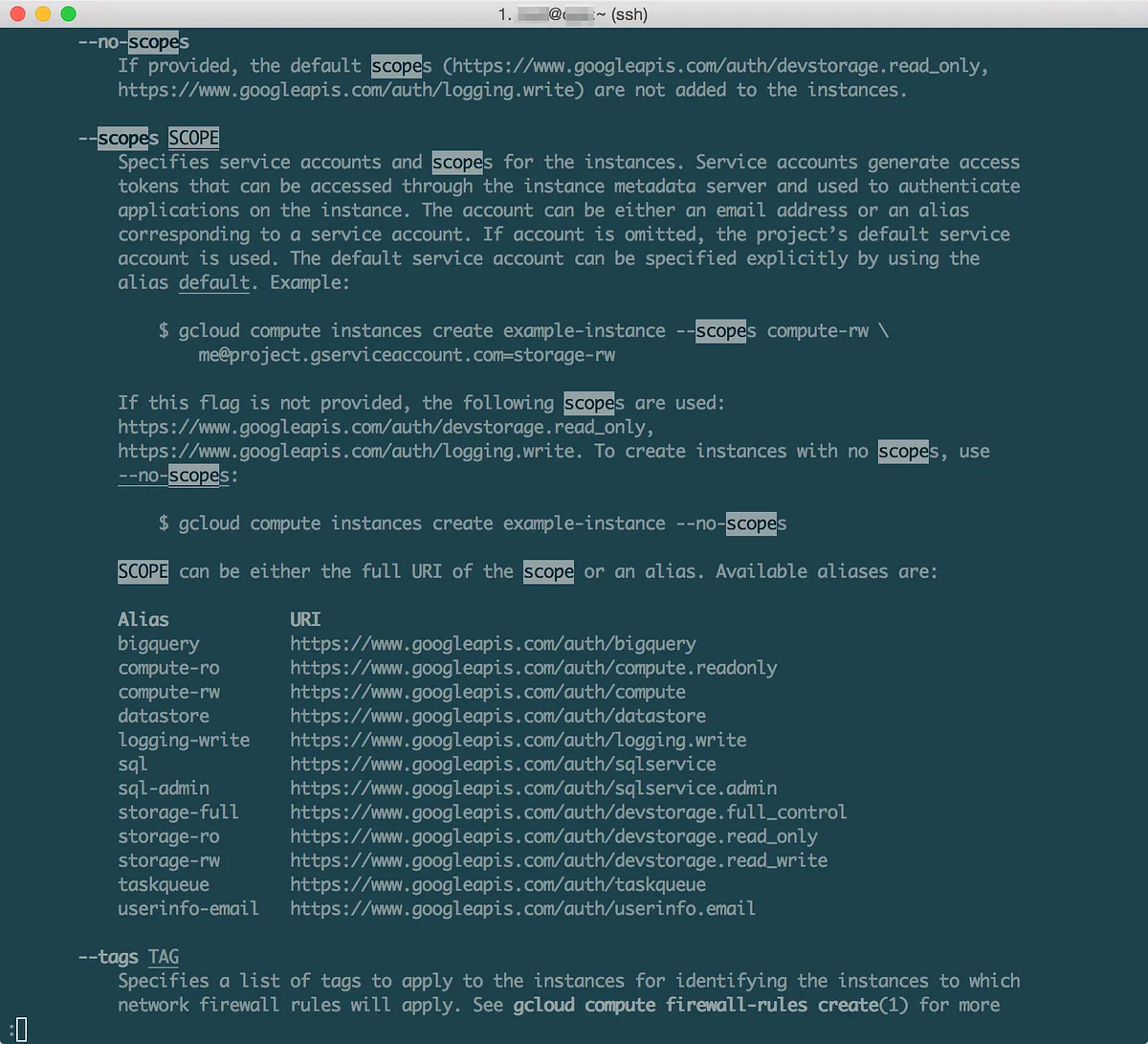
## Instance Scopeに気をつけること!
Instanceのscopeでloggingを入れること
これやっておかないとgoogle-fluentd側で認証設定しなきゃいけないのでめんどい
**というか全般的にGCPではScopeに気をつけること
なぜならInstance作ったあとにScopeの変更追加できないから**
Plain textcontent\_copy
```
Alias URI
logging-write https://www.googleapis.com/auth/logging.write
```
helpは以下
## Authenticating from Google Compute Engine
### When you set up an instance to use a service account, Google Compute Engine automatically creates OAuth2 refresh tokens…
cloud.google.com
Plain textcontent\_copy
```
gcloud compute instances create --help
```
## Install google-fluentd
ぶっちゃけDocumentの通りにやります。
Plain textcontent\_copy
```
curl -sSO "https://storage.googleapis.com/signals-agents/logging/google-fluentd-install.sh"
sudo bash google-fluentd-install.sh
```
rpmでinstallされる
Plain textcontent\_copy
```
rpm -qa | grep google-fluentd
google-fluentd-1.3.2–1.x86_64
google-fluentd-catch-all-config-0.2–1.noarch
```
ちょっと中身確認
Plain textcontent\_copy
```
rpm -ql google-fluentd
------- 大きすぎるので省略 --------
rpm -ql google-fluentd-catch-all-config
/etc/google-fluentd
/etc/google-fluentd/config.d
/etc/google-fluentd/config.d/apache.conf
/etc/google-fluentd/config.d/cassandra.conf
/etc/google-fluentd/config.d/chef.conf
/etc/google-fluentd/config.d/gitlab.conf
/etc/google-fluentd/config.d/jenkins.conf
/etc/google-fluentd/config.d/jetty.conf
/etc/google-fluentd/config.d/joomla.conf
/etc/google-fluentd/config.d/magento.conf
/etc/google-fluentd/config.d/mediawiki.conf
/etc/google-fluentd/config.d/memcached.conf
/etc/google-fluentd/config.d/mongodb.conf
/etc/google-fluentd/config.d/mysql.conf
/etc/google-fluentd/config.d/nginx.conf
/etc/google-fluentd/config.d/postgresql.conf
/etc/google-fluentd/config.d/puppet-enterprise.conf
/etc/google-fluentd/config.d/puppet.conf
/etc/google-fluentd/config.d/rabbitmq.conf
/etc/google-fluentd/config.d/redis.conf
/etc/google-fluentd/config.d/redmine.conf
/etc/google-fluentd/config.d/salt.conf
/etc/google-fluentd/config.d/solr.conf
/etc/google-fluentd/config.d/sugarcrm.conf
/etc/google-fluentd/config.d/syslog.conf
/etc/google-fluentd/config.d/syslog_endpoint.conf
/etc/google-fluentd/config.d/tomcat.conf
/etc/google-fluentd/config.d/zookeeper.conf
```
がさっとひと通り入る感じ
rpmとかdebとかでsetupしたらここにあるMiddlewareならもう動くと思われ(試してないからわからんけど
## config作成
ちょっといらないconfig多くて気に入らないので
おもむろにmove・・・w
Plain textcontent\_copy
```
mv /etc/google-fluentd/config.d /etc/google-fluentd/config.d.org
```
そして/usr/local/etc配下にdirectory作成
Plain textcontent\_copy
```
mkdir -p /usr/local/etc/google-fluentd/config.d
cd /usr/local/etc/google-fluentd/config.d
```
取り急ぎsyslogとnginxとmysqlとかphp-fpmとかのconfig作りたいので以下のようなことをごにょごにょやる
Plain textcontent\_copy
```
cp -p /etc/google-fluentd/config.d.org/syslog.conf /usr/local/etc/google-fluentd/config.d/
cp -p /etc/google-fluentd/config.d.org/syslog_endpoint.conf /usr/local/etc/google-fluentd/config.d/
cp -p /etc/google-fluentd/config.d.org/nginx.conf /usr/local/etc/google-fluentd/config.d/
vi nginx.conf
type tail
format none
path /var/log/nginx/access.log
pos_file /var/tmp/fluentd.nginx-access.pos
read_from_head true
tag nginx-access
type tail
format none
path /var/log/nginx/error.log
pos_file /var/tmp/fluentd.nginx-error.pos
read_from_head true
tag nginx-error
```
ほとんどの場合は以下を変更するだけで大丈夫だけど
formatが特殊だったら正規表現と格闘して下さいw
変更箇所の例
- path
- pos\_file
- tag
## symlink
/etc/google-fluentd/config.dをmoveしちゃってるのでsymlinkはります。
Plain textcontent\_copy
```
ln -s /usr/local/etc/google-fluentd/config.d /etc/google-fluentd/config.d
```
うちは/usr/local/etcをgit化しているのでおもむろにpushして
[cinnamon](https://github.com/kentaro/cinnamon)でオーケストレーションさせてワ~とpullしますw
## configtest
Plain textcontent\_copy
```
/etc/init.d/google-fluentd configtest
```
## start
/etc/init.d/google-fluentd start
## logをみて正常に動いてるか確認
Plain textcontent\_copy
```
tail -f /var/log/google-fluentd/google-fluentd.log
```
動いていればlogはCloudLoggingに流れます。
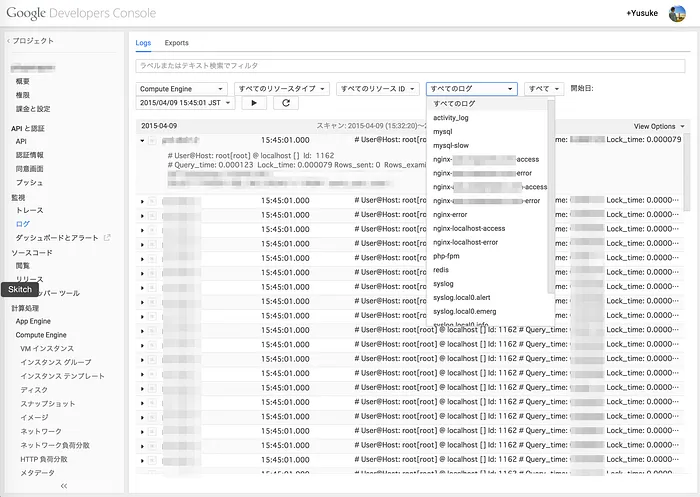
## Cloud Logging
画面はこんな感じ〜!
Google Cloud Logging
できた!
が!
なぜかMySQLのLogでうめつくされてる気がする・・・・w
横で作業してるからだと思うけど・・・
違う・・・こいつか
今は状況的に入れてるだけか
Plain textcontent\_copy
```
log-queries-not-using-indexes = 1
```
しかしMySQLのLog自己主張激しいな・・・
ちょっと内容と違うからいいか
CloudLogging設定してたら気がついてしまったもんで・・・w
## Cloud Loggin Exports
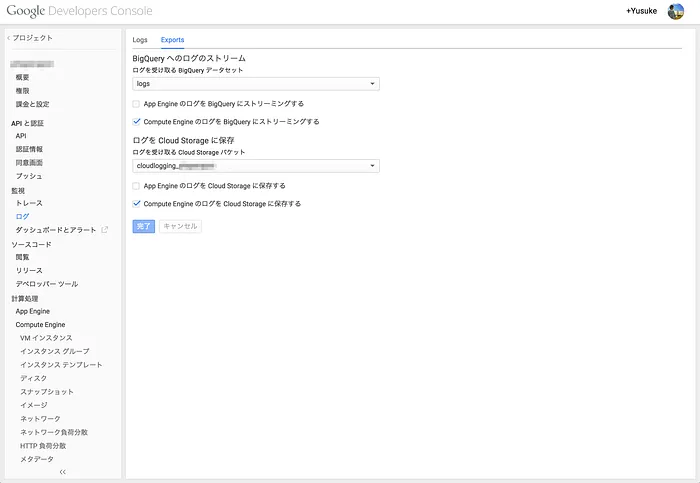
exportの設定画面は以下
それぞれに出力できる!(最近のどっかのupdateで前より使いやすい形の外部出力になった!
- BigQuery
- Cloud Storage
Google Cloud Logging Exports
## BigQuery
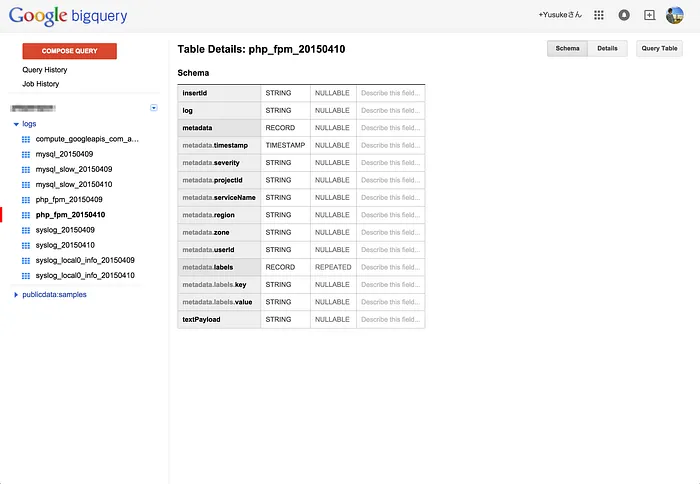
どんな感じで出力されるか確認
こんなtableに出力される
- \[fluentd tag\]\_YYYYMMDD
BigQuery
## Google Cloud Storage
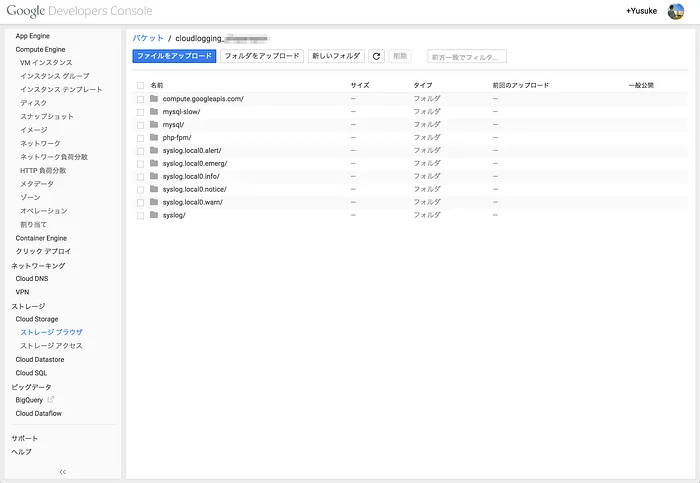
Google Cloud Storage
ちょっとわかりにくいのでgsutilで
止めたり動かしたりしてるので時間が飛び飛びになってるけど・・・
Plain textcontent\_copy
```
gsutil ls -R gs://cloudlogging_xxxxxxx/
gs://cloudlogging_xxxxxxx/compute.googleapis.com/:
gs://cloudlogging_xxxxxxx/compute.googleapis.com/activity_log/:
gs://cloudlogging_xxxxxxx/compute.googleapis.com/activity_log/2015/:
gs://cloudlogging_xxxxxxx/compute.googleapis.com/activity_log/2015/04/:
gs://cloudlogging_xxxxxxx/compute.googleapis.com/activity_log/2015/04/10/:
gs://cloudlogging_xxxxxxx/compute.googleapis.com/activity_log/2015/04/10/00:00:00_00:59:59_S0.json
------- 大きすぎるので省略 --------
gs://cloudlogging_xxxxxxx/syslog/:
gs://cloudlogging_xxxxxxx/syslog/2015/:
gs://cloudlogging_xxxxxxx/syslog/2015/04/:
gs://cloudlogging_xxxxxxx/syslog/2015/04/09/:
gs://cloudlogging_xxxxxxx/syslog/2015/04/09/03:00:00_03:59:59_S0.json
gs://cloudlogging_xxxxxxx/syslog/2015/04/09/04:00:00_04:59:59_S0.json
gs://cloudlogging_xxxxxxx/syslog/2015/04/09/05:00:00_05:59:59_S0.json
gs://cloudlogging_xxxxxxx/syslog/2015/04/09/17:00:00_17:59:59_S0.json
gs://cloudlogging_xxxxxxx/syslog/2015/04/09/18:00:00_18:59:59_S0.json
gs://cloudlogging_xxxxxxx/syslog/2015/04/09/23:00:00_23:59:59_S0.json
gs://cloudlogging_xxxxxxx/syslog/2015/04/10/:
gs://cloudlogging_xxxxxxx/syslog/2015/04/10/00:00:00_00:59:59_S0.json
gs://cloudlogging_xxxxxxx/syslog/2015/04/10/01:00:00_01:59:59_S0.json
```
## 感想
ちょっと前まで
[loggly](https://www.loggly.com/)使ってたりとか[papertrail](https://papertrailapp.com/)検証してみたりとか
どちらもデータ大きくなると高くなるんで悩んでたりして・・・
これがGAになったらこれでいいなぁ〜
**Cloud Monitoring**と統合されて**Alerting Policy**とかでNotification飛ばせると素敵な気がする・・・
統合はムリか
統合じゃなくてもNotification飛ばせるならなんでもいいやw
できれば
**時間間隔に対して文字列(正規表現)で何個以上だったら通知**
とかできると嬉しいなぁ〜
通知先はCloud Monitoringと同じだけ種類があれば最高!
あと**gcloud**にも統合されるっぽい
今previewに入ってる
以下サンプル
Plain textcontent\_copy
```
gcloud preview logging
Usage: gcloud preview logging [optional flags]
group may be sinks
command may be list-logs | write
Manage Google Cloud Logging.
optional flags:
--format FORMAT Format for printed output.
--help Display detailed help.
--log-http Logs all HTTP server requests and responses to stderr.
--project PROJECT_ID Google Cloud Platform project ID to use for this
invocation.
--quiet, -q Disable all interactive prompts.
--trace-token TRACE_TOKEN
Token used to route traces of service requests for
investigation of issues.
-h Print a summary help and exit.
command groups:
sinks Provide commands for managing Cloud Logging sinks.
commands:
list-logs List log collections that contain any log entries.
write Create a simple log entry.
ERROR: (gcloud.preview.logging) too few arguments
```
### list-logs
Plain textcontent\_copy
```
gcloud preview logging list-logs
NAME
compute.googleapis.com/activity_log
mysql
mysql-slow
nginx-xxxxxxxxxxx-access
nginx-xxxxxxxxxxx-error
nginx-error
nginx-localhost-access
nginx-localhost-error
php-fpm
redis
syslog
syslog.local0.alert
syslog.local0.emerg
syslog.local0.info
syslog.local0.notice
syslog.local0.warn
```
### Quota
あとQuotaの拡張できるのかなぁ〜
## Quota Policy
### The following limits apply to your use of Google Cloud Logging:
cloud.google.com
一旦まだbetaなんで待つしかないけど
転載:[Google Cloud Logging(beta)を試す!](https://medium.com/@yusuke_h/google-cloud-logging-beta-%E3%82%92%E8%A9%A6%E3%81%99-7694826baece)
この記事は [Medium(@yusuke\_h)](https://medium.com/@yusuke_h) からの転載です。
## この記事を書いた人
[](/authors/yusukeh/)
### [yusukeh](/authors/yusukeh/)
Fly high. Think deep. Move fast. Go far.🦅
- [X](https://x.com/yusukeh "X")
- [GitHub](https://github.com/yusukeh "GitHub")
- [Medium](https://medium.com/@yusukeh "Medium")
- [Facebook](https://www.facebook.com/yusuke.exzm "Facebook")
- [Instagram](https://www.instagram.com/yusukehasegawa/ "Instagram")
- [LinkedIn](https://www.linkedin.com/in/hasegawa-yusuke-091b4164/ "LinkedIn")
[プロフィールと記事一覧](/authors/yusukeh/)